Santa Claus Field Facilities
Maps
Jan
20th 2019
| RD | Space 2018 | Facility | Houses | Maps |
| |
Santa Claus Field Facilities |
Double Buffering power [9th Feb 2019]
|
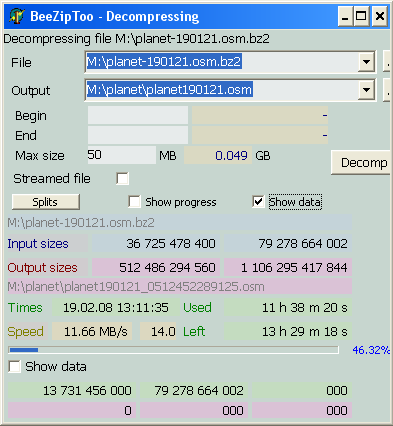 FILE : BZ2 file on disk OUTPUT : Output file skeleton - name gets always byte position, after name, before dot. - existing output files are over written without questions. BEGIN: Intended beginning position in BZ2 file. SHOW DATA : Show data about progress. DECOMP BUTTON : Begin decompression. You cancel the progresses with a click to some exe button. Six text fields at the bottom are for debugging and getting various values from the running program. |
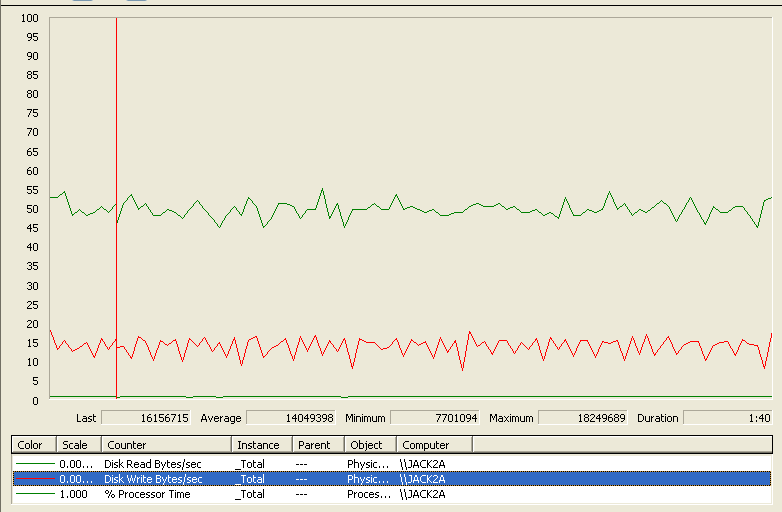
This screenshot is from Windows performance monitor. Taken at the same times with another screenshot. Disk output 10-19 MB/s.
Processor load is around 50%
Over 2TB disks [7th Feb 2019]
Purchased one 3TB disc. When I tested, older Windows operating systems didn't recognize it. Hardware accepted the disc, it worked without problems. Microsoft has been marketing NTFS ( for ages ) by saying, that unlike FAT-32, NTFS supports bigger than 2TB discs. These claims are in official Windows specs. NTFS format seems to die at 2TB. MS has developed a new-new-tech-file-system for breaking the 2TB barrier with NTFS format.
Over 2TB new-new disc misses boot record, can use it only in later Windows OS. DOS was the only OS, with what you could delete new-new formatted discs without newer Windows OS.
FAT-32 has bigger discs in the standard, but Windows rejects big discs. Mini-Aide showed the big disc, and was willing to format the disc to FAt-32 and 2TB capacity with either FAT-32 or NTFS format. Format failed to Windows' rejection.
Via network it is always possible to use big drives. In networking local computer plays with file names and paths. Disc sizes and addresses are insignificant. Network drive is one way to use big discs. But these drives are expensive. They are computers : they have operating systems, CPUs, RAM and so on. If I do not remember wrong, first cloud computers ( = network drives ) were made as early as in 1980s. Brand new things ... media players, pressure bulb displays, AC-networking, digital paintings, digital democracy / next generation web, etc ... are rare things in computer world.
- - - -
If you have a network drive, Windows does not automatically show disk under Computers Near Me / Entire Network. You get the drive / drives visible with Map Network Drive function. It is in Windows Explorer Tools menu. ( in newer Windows version Menu bars must be enabled, before they show ). When you open the Map Network Drive dialog, the dialog behind Browse button shows all connected devices. Also the network drive. If you have a wi-fi router, you can connect the drive with cable to the box. After that it is possible for anyone ( all computers ) to map and use the disc. Network drive doesn't need any drivers and utility programs. When I checked the web hardly anyone - from the web/network-gurus - seemed to know this.
- - Network drives [15th February 2019 ] - -
Purchased a network drive for the 3TB disk. Installation of the new desk into drive and the drive into computer system took 12 hours. In order to get this simple 30 minute thing done with modern miracles ... Sheriff Mc Clouds ... you need also quite a lot of low level knowledge around networking and web hosting. Some experience from both is also needed. You cannot learn the required basics in an hour or two.
My older pAta network disk is better, faster and simpler to use. It does not for example necessarily need, that you format the installed disc. Important thing when the box goes broke at older age. When you have to install operating system and format the disc you can never recover your old back discs from the boxes, which have been discontinued. The same great ... bright on-screen ... stupidity followed the war of installation to the very end. Tight connection to the major axle-powers, MS-Google is suspected.
In good media player network disk, BIOS-Operating system is in on-board programmable ROM: It should also come into Windows and other network views automatically. Just like all the other network devices always do. Newer Windows seems to miss the view from connected network devices, you must set the workgroup name to the one you see in Windows system setting / network info. Another way to create a connection with an outsider, is map network drive, with written network path. In drives setup there is always a text box for setting the name for Windows Workgroup. The default name in Windows varies with version and language. You can change it ( without reinstalling the whole os ), when needed or wanted.
The network disk does not need any security settings. The security comes from operating system or network connector module. Primary user / system administrator sets the security, when he-she takes the disk into use. Disks have never before had any securities, which prevents the access and slows down disk. Encryption is the only way to secure disk contents. Kids play to bypass other securities. All you have to do is to connect the disk into another device. Read the contents with another operating system. Encryption is the only thing "vintage" disks sometimes have. Traditional disk has a physical protection system. You must go to the computer, where the disk is. Fucking hacking jerks are naturally doing everything in their power to break the protection ... with all kinds of illegal, hidden add-ons.
When greedy, extremist amateurs starts to do business, it almost always results into major downgrades in technology ... and sales numbers, too.
Media player network disk should always follow media player standard : Prefer FAT-32 format from others. Private user does not have spare boxes, for extracting data from the broken box. FAT-32 format allows you to connect disc into any sAta connector, which supports the disc size.
Media player and it's devices are never allowed to form automatically connections or force user to use web. Web activities are made with certified browsers, eMail and FTP programs. Media player operating system prevents other programs from opening the connection to web.
Network drive and router is a handy thing in homes-houses, where the same movies and music are watched and listened in more than one room. You can hide the drive from sight, you need only one copy from each movie-album-photoset-book. You can keep the drive powered all day long, 3.5 inch disk is stronger / more reliable than players 2.5 inch disk. Drive goes to sleep mode, when it is not used. It wakes up automatically, when someone wants to use it. In principle you should always place big 3.5 inch disk into horizontal position. It weighs a lot, vibrations and momentums tends to loosen the mounting screws. When the disc is in horizontal position, the support takes most from the created forces. If the box is in upright position and it starts to keep noises ( when it is used ) the most likely reason is in loose mounting screws.
In reliability and speed network drive is near internal sAta disk. Better than USB. Network drive to network drive copy for example hardly ever ends into HW conflict and crash. Happens often with usb-2 and super-fast usb-3 ports. Com and Usb-1 are slow, crashes are rare.
Typical next generation router could have 4 circuits in the box. There are circuits and outlets for internal network, external network, digital democracy and next generation web. Official eMail circuit is also possible. Also possible that eMail goes to external network circuit. Separation, which starts from circuits and wires is the only way to guarantee, that no-one can skip from one line to another. In AC network skipping and frequency scanning are rather easy things to do. Scanning is a well known problem with wire-less connections. When possible, digital democracy should run in wires. Wireless connection allows the scanning / data manipulation of the group, which is "behind" the wireless part. You cannot scan data, which runs in some other completely wired route. Data must always go through the wireless bridge.
When new displays and digital paper comes, you can the add contents from hard disks to bookshelves, if you want to. With a tap, you can open the album, movie, photoset. book to the nearest screen / player. Digital book shelf does need as much depth than traditional, then you can scroll the shelf, just like computer screen. Shelf acts as an additional desktop / file explorer.
Media player provides frames for building a computer system, without a specific shape / box. The shape and form is up to you and your needs. The system can have burglar alerts, temperature-light controls and so on. Systems, whose lifespan is over a decade. IT sales concentrates on extensions, their software. Useful new software for existing player and it's extensions.
If your new detached house has central heating, the heating system comes with a module, which connects the system to media player. You can check the situation in boiler room from the living room display. You can get alerts from dangerously low oil levels, detected malfunctions in the system and excessive energy consumption.
An average car consumes around 1000 liters gas per year. Bigger detached single family house consumes already easily over 3 000 liters oil. Shift from coal-oil to nuclear power in heating is one bigger reason for local droughts. "Environmentally friendly" nuclear plant does not create any humidity. It kills people, animals and plants also with other exhaust emissions.
FAT-32 Formatting tool download [24th Jan 2019]
If you need FAT-32 formatting tool for bigger than 32 GB disks, there is Mini Aide Fat-32 formatting tool. Midi Aide company is defunctional, but the free ware version from their program is still available. Mini Aide works with Windows 2k and newer. You don't need Windows Me for partitioning.
Simple partitioning and formatting system is tested and verified to work. Recovery of the accidentally deleted partition is also tested.
Check partition and defragmenter uses MS Windows functions, do not use defragmenter via Mini-Aid ( program crashes and locks the computer ). Then you should never try to resize or move partition on fly. Same advise goes to Windows with same functionality. Mini Aide resizer is not tested. MS made re-sizer is certain not to work, it usually ruins the data from the manipulated HDD. Physical failures ( bad clusters ) are also possible.
Tool works with USB dongles, SD cards and USB hard disks. Max disc size is 4TB, it comes with 64kB sector / allocation unit size Tool does not allow you to use 128 kB ( 8 TB disc ) and 256 kB ( 16 TB disc ) allocation units. 256 kB is the biggest unit size, all FAT-32 devices are excepted to support. The actual max size is dependent on disc. Disc is divided to cylinders and sectors. Number of clusters and sectors changes the max size, just like used allocation unit.
Mini Aide keeps the partitions visible in DOS. To for example Norton Ghost.*
Mini Aide program works often so, that first you collect things to pending work list. When you click "Apply" button, the program starts to process things you have added to pending list on the left.
Download Mini Aide : miniaide-fat32-formatter-home-setup.exe
* When you for example change hard disk, where you have operating system, you cannot boot the computer to hard disk. You got to boot the computer with diskette or CD. All newer operating systems lock files from HDD, you can never delete or replace these files. Some are opened exclusively. When so, you cannot copy these files to your back ups. With Norton Ghost you can copy the old OS-drive to new disk and new drive in ten to twenty minutes. The actual Ghost is DOS program. It works with all overlying Windows versions. In at least Windows 7 SP1 Ms Image backup, which works in Windows, naturally failed to restore the created image back to HDD. You can get the program for restoring the images later ... after you have upgraded your Windows to version X. Which is bundled with some new essential restrictions, faults and bugs. These promotes and are fixed in the next - Windows XI - operating system upgrade. The image creator makes the images too quickly, faster than HDD can move data. The whole system is a fake.
- - - -
Fat-32 clusters and sectors have nothing to do with physical hard disk. On hard disc there are cylinders, heads and sectors. Hard disk uses fixed 1 byte allocation unit / sector size. This unit is divided to 256 bits. 64 kB allocation unit means that, operating system always reads and writes 65 536 bytes at the time. When you write text with editor, which reads and writes data directly to opened file, your key strokes goes into data buffer, which contains copy from the hard disk data. Time, when the buffer is written to disk, depends on OS, file size and used editor.
FAT-32 name comes from max file size, which is 4 GB ( = max value of unsigned 32-bit integer ).
Ms made exFat is obviously not FAT-32, looks like an alias for NTFS. Not willing to spend more time with fucking hacking jerks .. greedy and disgusting business geniuses. Nothing else works, but pricing and demands for buying new expensive upgrades. Not forgetting extremist orgasm hunting.
Home audio-video systems uses and media player will use FAT-32 File Allocation Table system. FAT-32 and hard disks will get enough capacity for storing full length good quality 4k movies. There is back up problem with extra large disks. Back ups last long and they need lots of space and money. If you buy capacity for full back ups, you tend to use the back up capacity to new contents. Limited size forces you to buy more than one disk to media player. If one disk for example falls to floor and goes broke, you do not lose all the data you had before small accident.
With current tech ripping of 2TB from Dvd's takes weeks. The space below media room's raised floor is good place for CD-DVD-BD discs and their boxes.
Textbase conversion from Open Street Map XML format [20th Jan 2019]
Chapter has technical descriptions for Textbase file conversion from Open Street Map files and their contents.
Open Street Map data is used in freeware GPS programs. Google, Bing and Yahoo like map can be found from https://www.openstreetmap.org
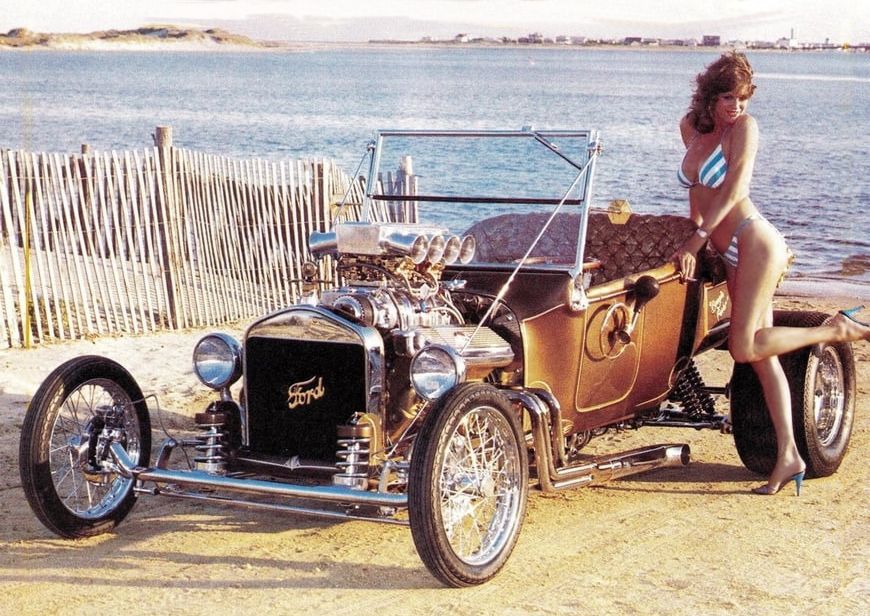
Cup-C Hot Rod ... and some old mobbed T-Ford in the background.When you pack big osm files, zip is the fastest format. When you pack files, you should use native zip packer. My WinZip 9 Pro is at least 2 times faster than WinRar 3.3 Plus ( with Rar-file format ), around 10 times faster than 7z freeware packer PeaZip ( zip format ). With WinZip you can split packed file into smaller files. First you have to pack the file as whole. WinRar refused to unpack split files, PeaZip unpacked the file without errors. WinZip packs 10 MB text file in 1.1 MB size. BZ2 has tighter default ratio, packed 10 MB file takes around 0.9 MB.
Extraction tests [3rd Feb 2019]
Downloaded full sized copy from the OSM base. Tested the extraction with Intel 2.8 GHz 478 CPU and also with later Intel 2.8 GHz 775 CPU. These computers are as equal as they can. They used same HDD. They had 2 GB RAM and same generation sATA controllers.
478 began the extraction with 9.5 MB/s output speed. 775 began the extraction with only 2.2 MB/s speed. When dealing with big files and BZ2 compression, extraction speed seems to fall a lot with size. Later at 340 GB 478s average output had fallen to around 5 MB/s.
Noticed already earlier, that 2.8 GHz 478 seems to have much more better efficiency ratio than common Intel CPU. When you load the processor, the heat production and temperatures stays at low levels. First I though, that the temperature sensor was broke and built a second 2.8 GHz 478 desktop. It runs also at low temperatures, without additional cooling. From the sample you see how much efficiency can affect to the real life operating speeds. In principle and on paper these computers should do the job with the same speed. According to Intel, 478 should be quite a lot slower than their later miraculous artwork.
Media Player - with what you watch videos and listen music - needs 478 and test like continuous-integrated power. Power without massive heat generation and fans. It is not possible to fix the internal problems with fans. Big fan allows you to keep the computer running, but it doesn't affect to the actual performance penalty and excessive heat generation. These things come from the overloaded CPU. Big fan prevents heat oriented short cuts and burns in CPU.
- - - -
Made also further tests with the packing software. My WinZip began packing of OSM data with over 15 MB/s speed. In the same computer and material the next best - WinRar - started packing with around 2 MB/s. Freeware ZIP fell also to 2MB speed class. Some tight web formats fell below 1 MB/s.
As you can see from the speed tests, commercial software almost always works better and faster than freeware. After freeware matches commercial stuff , you start to get more donations. The software converts into semi-commercial program.
In Media Player you can get deals from HW manufacturers. Media Player OS misses most from additional software. It has file explorer, maintenance programs, machine level settings, etc. only. HW manufacturer selects the programs to the machine. You do not want-need big wave editors and game packs in small handheld substitute for cellular phone. After HW manufacturer have selected the programs, they can be fine tuned, so that they are fast and work well in the sold products. Windows 9x had selections for all additional MS programs, you install with the operating system. MS removed the selections from XP. In XP you can still remove few MS made add-ons after the installation. Others have hard coded links to operating system.
Digital democracy will work in media player. It is a separated system, with as little in common with the rest as possible. You use the same keyboard, display and desktop than with common programs. Hardware is detached from common HW, an application from digital paintings / important documents. Digital Democracy has it's origin in chance and idea of getting legal bordellos inside US borders.
Noticed that eBay is nowadays promoting and selling illegal copies from the latest versions of all major 3rd party software. With around $5 payment, which goes to cracker, you can get the latest version from $40 000 Auto Cad, $1 000 Adobe Photshop, $600 Corel Draw and many others.
Although movie companies and midgets tried to prevent the coming of Media Player computers, midget-movie company cannot forbid ripping of DVDs and BDs. Rights and limitations for ripping and copying comes from the laws. You are always allowed to make copies for your own use. And on the other hand, distribution of the copies is always forbidden.
Textbase changes [24th+28th Jan 2019]
Made compressor routines for XML to Textbase conversion. The format was changed and changes a little all the time. Develop things in real environment, with readyness to react to the noticed possibilities to improve the system. Took the system into use soon after graduation, around 30 years ago. Cost of main frame database system is counted in millions. Brand new dataBase design cost ( commercially with hired staff ) goes easily to billions. Same levels with the design of new car model. Deca-tech is priceless for brainless. Just like all the others.
- Chr-10 which ends the line is used a record separator char. It is followed line id character. When so the readers and writers are misaligned with one character in the initiator.
- For backward scroll you use interleave lines and parts. When you come backwards to the section you find #10 from it's place. It is followed with interleave Id : I. Interleave is followed with preceding block id. The block id followed with number of bytes to skip. Before backward id you have similar kind of forwarding id system. The space in between these two is ignored. When reader finds Interleave id, it jumps to interleave handler.
- All three container ids are equal up till id. After id Node has coordinates, ways and relations have shape codes and change-sets.
- Key numbers were converted to HEX numbers. Delphi converts string from hex to dec, when variable begins with $. Space was needed for adding spaces to the beginning of each longer than 1 char field. Empty spaces in between do not have to be spaces. They can have short string length indicators or HEX indicators. Length ends into CHR-12, line ids are over 20. Should remove length indicators from long keyword entries. With HEX keys system can have 288 trillion ids.
- Meaningless User id was removed from actual data. It was transferred to change sets. Removal shortened data.
- Id got alternative versions. The default version is always version ' '. Alternative version allows you to for example have user and official data for the same coordinate, etc. Case insensitive system can have 34 easy alternatives ( 0-9+ A-Z ) for the same thing.
Keywords got an alternative, chained keyword with value or name. Keywords
k="Highway" v="service"
k="service" v="parking_aisle"
k="name" v="Las Vegas Park"
can be converted / compacted into one line :
c=highway/service/parking_aisle n=Las Vegas Parkc line can have both values [ c=highway/service/parking_aisle v= $10 a day / n=Las Vegas Park ].
Spaces in keywords are converted into underline chars : Keyword does not need quotes.
Value and name need quotes, when it has slashes. First value entry is separated with space, others with slashes.
In DOS convention, equal sign right after parameter id, is optional. Preceding blanks need quotes.In principle you could have used compressed NTFS drives. When I tested, the compressed NTFS drive failed to work properly. It is also very slow, you would need HW based compression.
Obsolete formats
<?xml version="1.0" encoding="UTF-8"?>
<osm version="0.6" generator="CGImap 0.6.1 (1920 thorn-01.openstreetmap.org)" copyright="OpenStreetMap and contributors" attribution="http://www.openstreetmap.org/copyright" license="http://opendatacommons.org/licenses/odbl/1-0/">
[Nodes]
Nodes uses 64 byte base blocks.
Keywords must be aligned to 64 byte boundary.
Use Att 1+2 for longer keyword tags : 1 = 32, 2 = 128, 1+2 = 192-
---+---10----+---20----+---30----+---40----+---50----+---60----+---70// Nodes - fixed 64 bytes
xavv----+---10-- |---+---10-- |---+---10-- |---+---1 |---+---1##
RAV-Latitude---- Longitude--- Id---------- Changeset UserId---##
n.V- 36.1412950 -115.1734290 137043166--- 72213700- 12287936-##R = Record id for the line
A = Attribute, replaces visible. Att1+2 = line lengths, Att-4+8 = not used, Att-G = Government, X = Hidden
VV = Right aligned version number with A-z extension.Attribute is extended with A-z chars. X is Attribute 32, ~ means that all attributes are on.
Id, ChangeSet and UserId are unique numeric keys, they are not actual numbers. You cannot use them in common sorts.
Sort goes always with coordinates. Ids need coordinate based indexes for themselves.With 64 byte boundary 4 billion nodes takes 256 billion bytes or 256 GB.
In XML format and average 180 byte line length ( from the sample file ), 4 billion nodes takes 720 GB.
[Ways]
Ways uses 40 byte base blocks. You can embed two node references into one block.
Both reference blocks must have 40 byte boundaries.
Use Att 1+2 for longer keyword tags : 1 = 20, 2 = 80, 1+2 = 160
----+---10----+---20----+---30----+---40----+---50// Way points - fixed 40 bytes
RAvv Id---------- Changeset UserId---?##
|---+---10-- |---+---1 |---+---1?##
w.00 137043166 72213700 12287936 ##
-rn ----+---10-- ?##// Node reference in way, fixed 20 bytes
-k crossing-->=traffic_signals------>##// General ini / keyword entry uses 20-40-80-160 byte blocks in way sections
[References]
References uses 48 byte base blocks. You can embed two node references into one block.
Both reference and keywords blocks must have 48 byte boundaries.
Use Att 1+2 for longer keyword tags : 1 = 24, 2 = 96, 1+2 = 192
----+---10----+---20----+---30----+---40----+---50

r.00 137043166    72213700  12287936 ?----+-------##   // References - fixed
48 bytes

-k crossing-->=traffic_signals--------------->##   // General ini / keyword entry uses
24-48 byte blocks in references sections
|---+---10--|---+-##// Node in reference block, 24 bytes
-mn NodeId------r=stop##
-mw WayId-------r=stop -->##// Way in reference block
-mr ReferenceId-r=stop -->##// Reference in reference blockReferences is ref block misses blank separator char. Length needed shortening and coherent numeric id ends to alpha-char.
Primary contents in the section are mX entries.Attributes : Att-1 = 48 bytes, Att-2 = 96 bytes. Att 12 = 144 bytes.
Forward shortens to forw.
Backward to back
[Users], [Changed] x-Ref files
By default you should always have section names in the file.
----+---10----+---20----+---30----+---40// Time stamps for change sets - 34 bytes
|---+---1 |----+---10----+---20-
xc137043 2018-02-13T00:51:23Z##
xu137043 User name-------->##// Names for user ids - 32 bytes
NOTES
- Two numeric fields after each other are separated with spaces. It allows you to parse broken / misaligned base.
- Extended fields can only have base block multipliers.
- Base is big, it needs traditional dataBase readers and writers with fixed block lengths. Fixed width processing is around 10 times faster.
- Block lengths were adjusted to 32 and 64 bit readers. Exception = Timestamps.Boundaries goes so, that when reader comes, it always finds next lines with standard line lengths.
When reader scrolls around multi section file it finds also square brackets. When so, it checks section name and adjusts input buffer to section length.In this base sub item begins from character position 2. Sub item for sub item begins from char pos 3.
When primary loop discovers blank from pos 1 it skips directly to next line. It never checks the line it skips.- Attribute 8 is reserved for governmental data. When official maps come, they are added into same base.
- You can get the maps, even if the local government is not interested or is not yet maintaining the base.
- Governmental bases are not fault free.
FILE SYSTEM
System is made to around 50 MB files. Text editors, etc. cannot handle bigger files.
After downloading OSM files, eventually found out that, it takes over 10 hours to extract Europe's over 30 GB bz2 compressed OSM file :
- Two modern miracles systematically ended the decompression into crash.
- Windows failed to write decompressed files on "native" NTFS formatted disks correctly.
- Both multi-core miracles got permanent damages to OS and HW drivers from the decompression crashes.Files are coordinate boxes. All entries in the coordinate box goes into file ( within file set ).
- Min-max coordinates are placed into file names.
- OSM world is around 700 GB, so there will be 14 000 files.
- OSM world in text base format is around 400 GB, only 8 000 files is needed.In both formats each file-set fits into one directory.
- Also possible to build sub directories with coordinate boxes in the directory names.
- When file grows too much, you split it into smaller files and coordinate boxes.System needs a special directory-file scroller, which checks the given coordinate ranges from the file names.
- Most operating systems has internal cache for directory and file names. After first scroll names come from memory.
Extended range numeric character fields ( fixed 28th Jan 2019 )
There is a simple way to increase number range in fixed length text fields.
When field is 2 chars, you can use letters in the first character to extend range.
Version number 100 would be A0, 114 is B4, .12-4+--8-+----+G---+----+----+-X--+----+----+----+----+----xxxx = 6 attributes
----+---10----+---20----+---30----+---40----+---50----+---6 = 0-59, 0-599,0-5999, etc.
123456789ABCDEFGHIJKLMNOPQRSTUVXYZabcdefghijklmnopqrstuvxyz{|}~The maximum range for 2 byte A-Z+0 field is 0-339 -> Z9 = 330 + 9 = 339.
In case sensitive numbering numbers end to 59. This is theoretical limit. Usually you write the routine so, that actual range goes to 999 and the counter extends to 8 bit area. The overlap shows as boxes in text editors.
Ou, it's you ... Happy new year.Hmh. What are you looking for. Not an angel. I am a clown.
Stop nuclear plants, give up from converters, leave me alone.