11th June 2020 - Superfast and Delphi 5
Programmed a simple SRT-subtitle synchronizer with Fujitsu Superfast.
Few times CPU and computer almost stopped. Speed of other active programs
fell to around 1/10th from common. Took quite a long time, before I found
out the reason for the overwhelming slowness. Sometimes you I to reboot
the computer for getting speed back, sometimes speed came back after
closing Delphi. Haven't experienced such after Windows 3.1 ... awesome.
When you test and write programs with Delphi, in testing and finalization
you stop the program execution with intentional crashes. Every 5th minute.
In Dvd ripping Super fast with XP and internal Dvd drive is the
fastest. Super Fast with that Finnish 64 bit Windows 7 Pro is the slowest,
internal drive is just slow as external USB-2 drive. In earlier tests
Windows 8 and Windows 10 were slower than Windows 7. Windows X series,
especially Windows 10, operating has serious security issues. Safe
operating system, would have prevented the hacks, which permanently ruined
English Windows 7 installation.
If you want your software, drivers and hardware work in Media Player,
they must work with Windows XP. Media Player will get assignable IRQs,
DMAs and Memory spaces. Unlike Mr. Greedy and his dreamer team thinks, you
cannot always assign these settings automatically. With few selected
changes to hardware layout, Windows crashes in initialization and load up.
|
5th June 2020 - What is RAID in hard disks and network
drives. Back ups and ED tech.
Raid is at least 30 years old system, which gives protection against
physical hard disk failures. You should never mix raid with back ups. Raid
has nothing to do with back ups. It protects your data from HDD failures.
If your computer gets into mess, the mess is recorded to both RAID disks.
RAID was brought after millennium, with a faulty idea, that RAID would
be a automated back up system. Corrected the idea at around 2005, in
desktops and laptops RAID is nowadays abandoned legacy option for
configuring hard disks. RAID belongs to big main frame or mid frame server
computers.
When you buy a network drive with multiple hard disk slots, you should
configure the box so, that each volume is an independent volume. When you
do back ups, you make them onto one independent volume. Then copy this
back up onto another independent volume or completely independent hard
disk system ( like another network drive, USB disk, eAta disk, etc ). With
this system your daily, weekly, monthly and yearly back ups are protected
from both hard disk failures and file system messes in the back up system.
When your primary back up system fails and back up data is lost, you
should never take the backup copies into usage, before you know, why the
system failed.
When you use optical back ups, you don't necessarily need copies from
back ups. A copy from optical disc, in another location and safety
deposit, protects optical back up from fire and physical fault. Hard disk
is not an ideal back media. CD-DVD-BD-ED discs are much more better.
Currently also much more expensive. The burner drive tech lasts only 50 -
200 burns. The maximum, reliable burn count depends on how much the drive
is used as common CD-DVD-BD reader. From optical discs CD is the most
reliable. ED disc-drive tech beats current 40 year old tech in all aspects
... cost efficiency, durability, aging, maximum capacity and speed.
ED tech doesn't rotate discs. Head is the only moving thing. With
native discs head moves linearly on the surface. Linear movement is needed
for storing long frameless streams. In unpacked frameless video, each
recorded stream has it's own track. In order to record high quality
streams with one head, tracks must have equal lengths and recording
speeds. This demand cannot be met with rolling discs. When you put an old
round disc into drive, the head simulates the required rolling. ED tech
can record data also to magnetic tapes. With dedicated heads and drivers,
ED tech can read microfilms, photos, negatives, documents, 8-35mm movies,
VHS-DV tapes and so on. There will at least be ED drives and ED scanners.
ED empowers media player back up systems.
|
20th April 2020 - Ripping could take place faster
Picked a DVD rip pack from library. Measured times, the ripping takes.
- Super fast with Windows XP2 was twice as the best X-Rated Windows,
Windows 7. With internal sAta DVD drive XP reached around 11 MB/s speed,
another Surper Fast with Finnish Microsoft Windows 7 Pro fell to around
6-8 MB/s. Didn't bother to check slower X-rated Microsoft Windows
operating systems. Microsoft Windows 7 and Microsoft Windows 10.
- Dell Optiplex 360 with Windows XP3 and fixed speed 2.93 GHz duo core was
the fasted in sAta ripping. It reached around ripping 16 MB/s speed.
- Super fast with XP2 reached around 6 MB/s with exernal USB-2 DVD drive.
- When I checked Fujitsu Super Fast XP2 with simultaneous internal and
external ripping, there was no penalty from it. Speeds remained the same
as stand alone ripping.
- In double test Optiplex 360 ripping speed fell to around 12 MB/s.
Overall speeds could be higher. Order in ripping followed the earlier
experiences and expectations.
Due to the on-going assassination attempt and continuous disturbance-tempering,
not capable of checking BD ripping and USB-3 systems.
Do you know, what you can do with CHKNTFS ?
Almost right after I recovered the lost back disk, Fucking
Hacking jerks used ChkNtfs in the attempt to demolish the contents of the
lost-and-recovered back up disk. Very disgusting and dangerous people.
|
19th April 2020 - Media player upgrade is over now
Due to continuous, dirty disturbance, decided end media player project
for now. The native multi core programs for current binary CPU is
cancelled, due to heavy, continuous systematic from biggest beneficiaries.
Demand was heavily connected to the on-going assassination attempt. New
movie player was left without Blue Ray readiness. New desktop was left to
operate with Finnish Windows 7 Pro.
Numerous intrusions and on-site hackings in my old cell can be done in
co-operation with either local healthcare people or staff of local
municipal. Only. Pick-proof front door lock makes it impossible to come in
without keys, during the time I'm on coffee break or shopping.
|
| 18th April 2020 - Microsoft's effort to take the most from
... fun.
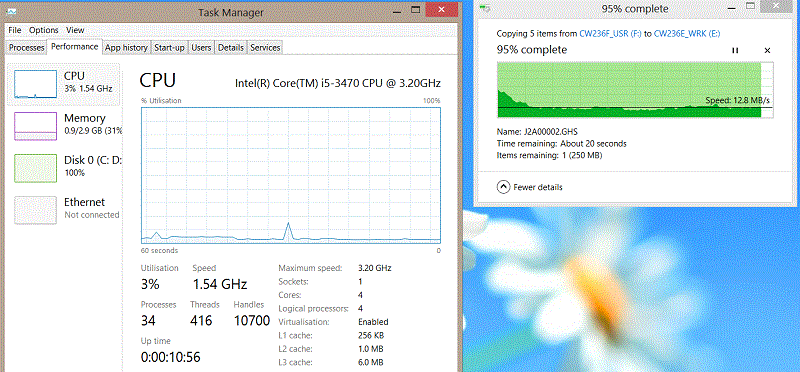
Microsoft Windows 8 Pro shares the ultimate slowness with Microsoft
Windows 10. Screen shots are from disk-to-same-disk copy.
64 bit Windows 7 Pro shares the falling speeds with Windows 8. It starts
from 40 MB/s and ends to 25 MB/s.
As you can see and verify with CpuCheck download, Super Fast's
multicore CPU can keep the nominal 3.6 GHz and 3.2 GHz speeds for ages.
Could remark, that Doctor Big Bill's "clever" instructions
for end users ( typically childish, faulty or stupid ) in new Windows XXX
are in line with this screenshot.
- - - -
AHCI system is very typical for X-rated Windows OS people. I took
almost a week, before I realized, that we are not talking about physical
format change of the hard disk. In principle and in the past Windows
allowed you to install drivers before you installed hardware. Since AHCI
is only Hot plug driver, you set on and off from computer's BIOS, you
should be capable of installing the required AHCI driver right before you
switch computer from IDE to ACHI mode or vice versa. In at least older
Windows versions it was possible to install driver without hardware from
device manager. With an installation program it is possible to replace old
drivers during boot up. Rather common practice in hardware's installation
systems. Demand for rebooting computer always comes from this swap.
|
15th April 2020 - Super fast
Fujitsu desktops
Found one Windows 8 Pro installation. Registered it to another Super
Fast for getting the box BD system ready. Most games and system utilities
refused to work. Problems not in hardware, great deal from the rejected
works when Super Fast runs with XP.
When I checked speed up system with Windows 8 monitors, it did reach
nominal 3.2 - 3.4. Typically in long run, where you need CPU transfer or
calculating power the speed falls to 1.5 - 2.0 GHz. Such could come
from overheating, but fans remains off-line when the speed falls. In
XP fans start and speed up with increased load.
If CPU has overheating problems, you lower the standard speed, with
what the CPU runs active user programs. Multi core system needs a flag for
setting the task to active or background handling. You might want to build
it so, that you can change the style on fly. There are for example lengthy
hard disk scanning programs, which could detect active jobs and choose
current execution mode accordingly.
Might also want to add slow ( possibly single core ) legacy mode to
CPU. For playing and using old programs.
uBuntu would need logical file system to least to sidebar. You need two
screens for copying files. You cannot open and close side-bar tags, so
that it shows also sub directories. File opens and saves are some times
tricky. When you cannot open sidebar, search of a file for opening ...
from nestled sub directory structures ... can be tricky.
In the old versions you could use FAT and EXT volumes on same HDD. Self
made volume / directory system helps you to use Windows programs in uBuntu.
Self made unix volume-system would make Unix-Linux programs easier.
Currently ... due to well known on-going assassination attempt ...
missing a super fast for uBuntu installation.
|
14th April 2020 - First game check-out with super fast
Fujitsu desktops
Due to on-going assassination and failed installations of Win 7 Pro,
the multi core check out with games was delayed. Not 10 years like native
multi core programs.
64 bit Windows 7 refused to work with 32 bit 3D games, 16 bit Windows
games and 8 bit DOS games. Had one GDI game development project. With
integrated graphics and 3 simultaneous GDI games, CPU reached 106% speed.
With one GDI game speed varied in between 70-98%. The 106% momentarily
peak goes to 3.4 GHz. Windows 7 loaded the games into 2 cores. CPU load
was 4 - 10%. Games reached 33 FPS speed, have a memory, that in T61p the
games reached around 18 FPS screening speed. Screening speed didn't fall,
when I loaded new loaded additional GDI screeners for getting the speed
up.
Looks like that speed up system works with games. Don't know yet how it
goes with PCIe graphic card and only one 32 or 64 bit 3D game.
In common usage the super fast with Windows 7 or Windows 10 falls
behind all the others. When you have over 10 million active employed
users, small fall in speed and longer wait times costs a fortune. Small
boost gives big savings and small increase to paid wages and bonuses.
You have retail chain and 100 000 cash register machines on line 10
hours a day. If you have 10 customers per hour for each machine, you get
million payments in one hour. During one day you get 10 million paying
customers. One second delay converts into 2 778 hours delay. After upgrade
from XP to Windows 7 your retail shops need almost 1 000 new workers and 400 cash register
machines for the new recruits.
- - - -
When I checked media server and the lost 700 GB back up disk, it turned
out, that the disk was tempered either by Finns, Halloween Hackers and
Google or Microsoft. Demolition and recovery needs - with tools you can
get from HDD manufacturers - around 5 minutes. The preceding XP upgrade
for exFat didn't cause troubles in other computers. Five minutes is short
enough for making the mess during regular shopping trip. There has been
visitors - recently - during my shopping trips.
|
12th April 2020 - First test, speed test with Optiplex 360
Got Dell Optiplex with 2.93 GHz Duo Core going. Installed Windows XP3
to it. Currently checking if copies goes correctly. With XP3 and hard disk
to hard disk copy began with 129 MB/s speed.
Had temporarily 32 bit Windows 7 in the computer. Installation had
drivers which come with Windows 7. When I tested same copy with same
disks, disk contents and filling ratio, the computer began with around 70
MB/s speed. After 1st 100 GB everything went into a mess. Copy speed of
big files copies fell to 30 MB/s. The computer didn't work well with
Windows 7. Windows 7 tried to perform the copy with both cores. The CPU
load varied from 70 to 100% for both cores. It was not possible to use
smoothly other programs during the copy. As result from the ambiguous
copy, memory I-O started to fail. Or that's what resource meters said,
before they crashed.
|
10th April 2020 - First speed test
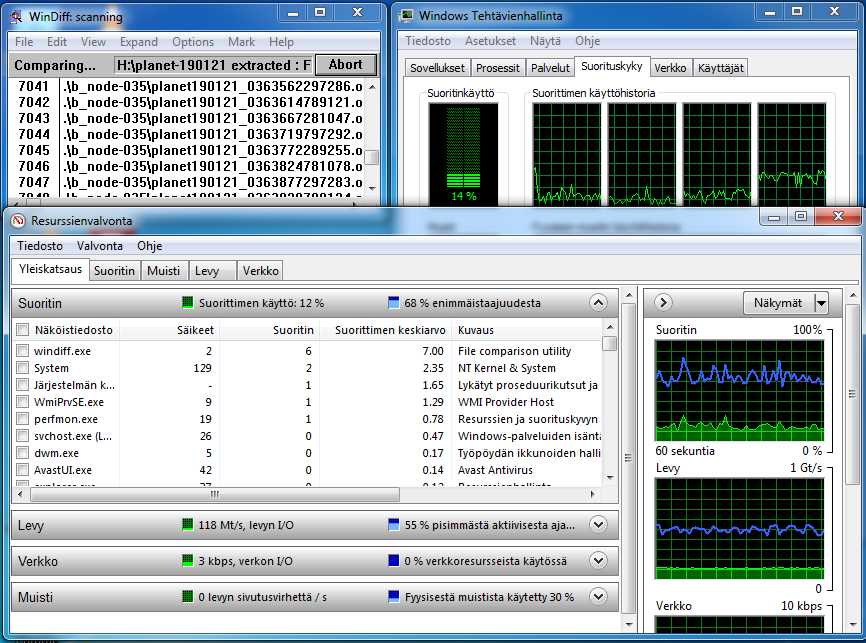
Made the first speed test to Fujitsu Desktops. With Finnish Windows 7
Pro. With 12% load CPU raised the speed to 50% to 70% from maximum.
- Windows announces the speed with CPU manufacturers nominal speed. For
these desktops CPU speed is 3.2 GHz. 50-70% from this comes to 1.6 GHz to
2.24 GHz.
- as you can see from the top right screen, WinnDiff uses only one core.
Two cores are running with idle load.
- in games and in default turbo mode, you should get the maximum speed
to over 100%. With these desktop maximum speed is 112%
- windiff is very simple program. It loads bytes from two files into
two registers and checks whether or not the values are the same.
- in the screen shot 32 bit Winndiff is comparing original and back up file on
two separate disks. The actual speed is around 59 MB/s.
- the back up disk is connected to desktop with USB 3 connector. Fairly
fast.
- there aren't any native multi core programs, yet.
+ Windiff obviously get some benefit from dedicated 4th core. Windows
gives 4th core a core number 6.
+ according to diagram 3rd core is used, but in list 3rd core doesn't have
any usage. Obviously core number 2 in the list.
|
9th April 2020 - Old vs. New - multi core
The jerks or assassinators forced me to take and put all old computer on-line.
The demolished disk contained system back ups from all.
The new multi-core desktops do not shine or raise up from the old
desktop array. Due to on-going assassination, new desktops are still
missing misses proper graphics. In common usage they are
actually slower than old desktops. Old single core CPU speeds up very
quickly and keeps the CPU load. In common file from HDD to network copy, single core uses 50%
from CPU capacity.
In clocked CPU system, the way OS and board loads CPU is another
important thing. If OS-board keeps the load at marginal levels, CPU hardly
ever reaches the maximum speeds. My old desktops have 2.66 or 2.8 GHz P4
CPUs. CPUs caches can also prevent sufficient loading.
- - - -
You might want to add simple numeric index to 3D model which is
pre-loaded to Graphic memory, with this index you could change, delete or
insert points to the stored model. You can build better and more
sophisticated index system to 3D driver interface or to 3D program.
In native media player program you have new set of sync functions and
calls. You must be capable of invoke procedure which runs in different
processor than caller. Into sync function-procedure you write code for the
called processor. Then you need an event for the time 2nd processor is
finished with the task. Then you need function for querying current state
of 2nd processor.
You could add this system also to multi core processors. If CPU has
dedicated core for OS and batch jobs, you could create a thread which
would run in the another dedicated core or tier system. If there isn't
dedicated cores, you run the thread alongside with other program.
It is not possible to assassinate a person - openly in public - without
support or commands from government and law enforcement.
- - - -
Media player, multi core tech and new 3D card-memory creates strong
demand for new programming environments and professional drawing tools.
None of the three works with old programs. They are included into standard
CPU instruction base. After tools you need migrated and native programs
for this trio.
Media player's operating system doesn't have utility programs. It
provides only basic functions. Computer manufacturer or retail pack
collector chooses the initial programs to the embedded or sold operating
system. OS core never changes much. Possible that you get the OS with
CPU-board-chipset. To the application maker and end user OS-core is always
the same. Driver support, API functions, exe layouts, etc are the same.
These bundled programs are cheap to buy. If computer manufacturer sells
50 million units with bundled program a year, with $5 price program maker
gets $250 millions a year. Typical program should cost as much as video
game, DVD movie or musical album.
When you buy a new computer, it comes with everything. All you have to
do is to power on the computer and start to play, work, and so on.
Microsoft Windows demolished software sector with poor quality embedded
additional programs. In media player you can use that $100 OS price to
programs you want to your computer. If you are buying a computer for
gaming, you can get 2 to 20 new games with $100.
Media player brings electric switches and gauges into home computers.
You can control lights, heating, door locks, etc with computer. You can
check indoor-outdoor temperatures.
It is possible that digital versions from old board games are coming
soon. Typical modern tv set is already as big or bigger than old boards
for various board games. Possible to build 3D boards. New remote control
system allows each player to have his-her own rc-unit. Old board games are
social games. Games you play with your friends or visitors.
This OS free system is not new. Big IBM computers came and obviously
still come with Operating System and dataBase interface. New system is
computer world wide. Interfaces for driver interface, interface for
programming languages and programs are shared. Same program and driver
installs to all bundled OS you get with CPU, Chipset-Mother board or a
whole computer. Interface is compatible with 32 bit Windows XP. XP can be
installed to common FAT 32 disk. If there is a new tech, which can be
installed to your computer as add-on card, you get extension to OS with
the card. There will be at least two OS manufacturers. Monopolies are
illegal, unwanted things. Typical media player program works in old and
new computers. Speed and other performance related things differs.
OS free system makes it easy to build multi core systems into CPU. You
can build optimized OS interface to your hardware.
|
9th April 2020 - Parcel deliveries
Might want to take old international payment system into usage. In
traditional trading, money and imported thing changed the owner at the
time. Banks had special import accounts. When you purchased a thing from
the abroad, you deposited the agreed payment to your import account.
Before or after deposit, the seller sent the purchase to buyer. When
purchase came to customs, the seller picked up the purchase. At the same
time bank accounted the money to seller.
In modern digital world system can be added to common bank account and
domestic purchases. In the digital system mails and delivery companies can
verify the deliveries and release the reserved money for the purchase. It
makes mail order purchases much more safer than current systems. It makes
it easy to buy stuff from unknown, small foreign seller. It makes the
purchases almost fraud free. For expensive purchases you can add sellers
verification of the quality to the terms of the release of reserved money.
You can also add a system, where the money from disqualified purchase
remains as the exchange reserve ( on the account ), until seller has
verified the return.
The accounting system needs also a chance to change the agreed price.
Typically disqualification leads to discount from the agreed price.
Discount to agreed price must always come from seller. In this cash
payment system every one has clean credits. If you need money for the
payment, you can ask domestic loan.
|
8th April 2020 - Clocked CPU and multi tasking
Possible that multi core and clocked CPUs need new multitasking
functions for operating system. CPU is not very likely to speed up, when it
uses only 10 to 15% from CPU capacity for executing 4 long zipping tasks
at the time. When you have many cores, tasking must load CPU properly. So
that caches and CPU clocker gets properly and fully loaded.
The speed of feed depends how long execution of one instruction takes.
One float calculation for example needs quite a many cycles before the
calculation is ready. If in one CPU the calculation takes for example 2
000 cycles, in another, optimized CPU, the same calculation might need
only 1 500 clock cycles. RISC CPU from 1990s reduced numbers of cycles per
instruction. MIPS counts ( millions of instructions per second ) for RISC processors
were 2 to 3 times bigger than common CPUs MIPS counts.
If average instruction takes 2000 cycles, in 3.6 GHz single core you
must feed 1.8 million assembler program lines per second. In 4 core CPU
the required feed is 7.2 million instructions per second.
The efficient way to use dedicated cores, is to assign tasks to cores
and use the cores as independent CPUs. When you assign cores to tasks, the
system is electric. Electric system is typically quite a lot faster than
SW system. Tasks have unique, non-conflicting RAM blocks. HDD, Graphic,
sound and network cards are shared. Just like USB connecctors.
In principle you should have all active tasks in CPU with priority
codes. If CPU cache is big enough, you can load the programs to cache as
whole.
In OS, you set priority codes and load the programs to CPU: With
priority code you might want to set the number of instructions, the task
forwards during it's time in CPU processing. When OS loads, unloads or
changes task's priority, you recalculate priority codes for CPU. When you
use counts, CPU speed and total for the priority are insignificant. CPU
simply executes given number of lines, before it switches to next task.
Then you need bit-mask for assigning cores to each task and thread.
This mask needs a chance to changes during the process.
You should not make the multi core and multi task handlers too
complicated.
Multi core and multi tasking instructions need a standard, so that the
same instructions work in all CPUs.
Might want to think about block command for giving compilers a chance
to finish variable-register manipulation, before switching to next task.
Blocks would speed up the execution and reduce crashes.
Crash prevention can be made manually in multithread program. When you
maintain thread variable from main or another thread, you can stop-suspend
the thread, whose variables and parameters you are changing. When you
suspend thread, it doesn't get CPU time, during the time you manipulate
thread variables. Simple and safe system. CPU never cuts the execution of
one assembler line / instruction. Multi tasking goes with line basis ...
opening of big or slow file blocks the computer, task or thread for the
time, opening takes.
|
6th April 2020 - Speed tests, copy source and target on
same disk.
Slowness of Windows 10 inspired to do a small, inaccurate speed test with
various computers. Fujitsu Desktop misses full driver support for XP.
My old SSD seemed to be quite a lot faster in new computers, with proper
drivers. The results are not fully comparable, only guidelines for speed.
When I tested Fujitsu, in copy from one HDD to another it topped to around
125 MB/s with sAta disks.
| Fujitsu Esprimo E992 E85+ |
Winner 10 Pro |
6 MB/s |
| Fujitsu Esprimo E992 E85+ with SSD |
Win 7 Pro |
120 MB/s |
| Fujitsu Esprimo E992 E85+ with sATA |
Win 7 Pro |
38 MB/s |
| Fujitsu Esprimo E992 E85+ with sATA |
Win XP3 |
13 MB/s |
| T60 + T61, sAta + ultrabay, sATA |
Win XP2 |
15 MB/s |
| T61, SSD in ultrabay |
Win 2k |
33 MB/s |
| - - - - - |
|
|
| Media Server 2, sATA Raid card |
Win XP2 |
18 MB/s |
| Media Server 2, internal old pATA OS disk |
Win XP2 |
5 MB/s |
Media Server's OS disk is 30 GB, almost broken, disk from late 1990s.
Time is not very gentle to old diskettes. Had to install one driver
from diskette and drive A. When I searched and checked old 10 kg or 20 lbs
diskette box, around 3 from 4 diskettes was no longer readable. Amongst
unreadable diskettes there was brand new and heavily used, both. Diskettes
in the box are 20 to 30 years old. Hard disks from late 1980s worked well
few years ago, when I checked them.
.
|
5th April 2020 - Disturbance to Media Player project
Lost one 1 TB hard disk during 2020 computer maintenance. First thought
that Media Server would have broken the disk during the boot up. Now it
seems, that it was already broke, when I put it into Media Server. Found
signs from burglary, and nothing from Media Server. Wide spread attacks
against Media Player project, eventually changed my mind about this 680 GB
file losses.
My old cell has pick proof lock, only ones who can come in without
breaking the door are local nurses and people from municipal's ( Pöytyä
) construction agency ( also the employer of Janitor ).
|
2nd May 2020 - Memories
Checked that Windows 7,8,10 need 1 GB RAM. These systems do not need
4GB, but 2 GB RAM. 32 bit Windows recognizes more than 4GB RAM. Not in my
knowledge how it uses it. Media Player needs SmartDrive and Win 9x like
setting to file cache. File caching is the only thing, where typical
program takes advantage from RAM. When for example Web browser loads a
page to screen, the pages, pictures, sounds and movies are loaded to file
cache in RAM.
File processing tools, video editors, undo functions for sound and
picture editors. 3D Games are major users of excessive amounts of RAM. Typical
program consumes less than 100 MB RAM.
Mircsoft, Google, Halloween Hackers and others are heavily against Blue
Ray and Media Player. All my attempts to install English Windows 7 into
media player desktop protos were ruined. Without saving any effort and
hesitation. Windows XP misses shell extensions ( possibly also driver
support ) for Blue Ray discs. You can add file systems into Windows
Explorer. Nothing prevents addition of Linux Ext file system to Windows.
Functionality of Linux and Blue Ray file system depends on the
implementation level of the shell extension. Zip file extractor is one
example from add-on shell extension.
If you have hot-swap network disk, they are all Ext-4 formatted. When
OS supports EXT-4, you can take the network disk and use it in windows or
mobile device.
AMD introduced 64 bit processors after millennium. No one benchmarked
these 64 bit CPUs. 32 bit computer is around 2 times faster than 64 bit.
In binary media player you should use 32 bit system. With 64 bit
extensions for RAM and HDD. Most files are less than 2 kB. Video and
backup files are almost the only ones, which needs over 2 GB file
size.
In scientific and internal calculations float needs often more than 64
bits. In money you survive with 64 bit currency. Most calculations are
integer calculations, and float calculations with two decimals. Two
decimals needs 4 decimal calculation accuracy. Fourth decimal can swing
the third up-down with one. Third either keeps the second or shifts it up
or down with one. In interest and other calculations you would need
scientific accuracy-shifting system. Difference in the numbers you
multiply or divide is so big. Might want to use integer floats.
PCs and computers have had problems with float calculation as long as I
have worked with computers. Should get accurate system to media player.
You don't need sin tables anymore. You can calculate sin, cos, tan, cotan
directly from the given angle.
|
26th April 2020 - Remote control for PC screen
You can build remote control system for PC screen with 4 RF receivers.
You have receiver in each corner. When user moves the control, signal strengths
in each receiver changes. With received signal you can move the pointer on
screen. With common RC buttons you perform general clicks and dedicated
clicks. RF signal doesn't bounce like IR signal. System is impossible with
infrared signal. You can build also add-on remotes for screens and PC.
Windows XP compatibility is expected.
|
21st April 2020 - On going assassination and first media
player desktop proto II
Obviously getting bodies for Media Player desktop proto. Buying two
Fujitsu-Siemens-Nokia ESPRIMO E910 E85+ desktops as base.
+ Computer is compatible with Windows XP.Chipset and others have drivers
for XP.
- Computer has serious power problem. Power is 280 Watts, the slot is not
standard slot. Power connector is 16 pins and unique to the board.
- You cannot change the power, also difficult to find a power to box.
But the continuation is dependent on on-going assassinators or delayed
delivery of one debit card. Bases need new parts worth of around 1 500
euros.
When I searched parts, learnt that MIDI interface and Sound Fonts are
dropped from new sound cards.
- There are awful many 3D games, which uses SF banks and MIDI for creating
various sound effects.
- Your 3 000 euro Gamers dream is around 100% sure to be smaller or bigger
disappointment.
|
19th + 20th April 2020 - On going assassination and first media
player desktop proto
Whilst backing up the computers, during long wait times, I have been
slowly making plans for the first media player desktop protos. On
trials section there a list of newly billed companies and agencies.
Besides Finnish government and few governmental agencies, the listed and
billed have been active with on-going assassination ... demolition of
media player project.
These two intended proto types are replacements for CD-DVD-BD player.
In principle media player for home usage returns to horizontal boxes.
Boxes, which fits into same slot in furniture than amplifier. Failed to
find horizontal boxes for self made computers. First protos are obviously
made from used computers. Current prospects fall slightly from the
recommended system to the latest games, slightly behind also in media
handling.
It would be very unfortunate, if those assassinators and other jerks
would manage ruin media player project. Your lives and welfare are rather
heavily dependent on this project.
- - HTPC boxes - -
Media player computer needs quite a many expansion slots at front. One
5.25 is essential. Into this slot you can install 1 x 3.5 disk or 6 x 2.5
disk or 4 x 2.5 disks or 2 x 2.5 disk and optical drive. Then you
need 3.25 slots for display and additional 2.5 inch disk bay. Into 3.25
slot you can get two 2.5 inch disks. There will obviously be displays for
both 5.25 and 3.5 slots. Touch screen needs more than one slot. Then it
might need slot for buttons and USB connectors.
The media player box width should be around 45 cm. Height can be around
20 cm, typical height is around 10 cm. Depth can be around 30 cm, typical
is 25 cm. After this audio device needs around 5 cm depth for wires.
In the back you need space for back plates, where you have 3.5mm,
RCA and speaker connectors. Box should always have mountings for
standard ATX power.
- 2 TB 2.5 inch disk needs around 6 W, 1 TB disk 4 W and 500 GB disk 2
W.
- 3.5 inch disk needs always over 10 Watts, 160 GB needs 20 W. Big 2 TB
disk might need 40W to 60W ( announced powers for big 3.5 inch disks are
not correct, these are said to consume less electricity than 2.5 inch
disk. Disk refuses to spin with two USB power wires )
- the only SSD disk, I have, doesn't have announced power values. Optical
drive might need around 4 W.
- CPU needs 70 - 100 W, GPU never falls far behind, new 3D graphic card each
needs 150 - 250 W. Each PCI card needs 10
W. Chipset, integrated DSP and integrated network controller needs also
some power.
? HTPC = Home Theater PC
? When you make a box for gaming, it should have at least one external
5.25 slot for CD / DVD / BD drive. There are busloads of games, which
needs CD-DVD-BD to present, when you play. Most boxes for gamers misses
the basic requirement.
- - Layout for the box - -
Box follows midi tower layout, it is only turned into horizontal
position. Width is 45 cm. Depth 25 or 30 cm. Height is 16 cm.
To the base layout you can make small variations. The way you put the
power into box brings you chances to change boxes layout.
Micro ATX board fits easily to maximum dimensions. Typical media player
board has all 6 PCI slots.
When you make the box, you have 14x16x9 cm PSU on other side, placed
vertically.
- This makes 16 cm height, 8 cm width and 15 cm depth.
- Alternatively you can have 16 cm height, 15 cm width and 8 cm depth.
Since height demand comes from cards and fan for CPU, the box is always
around 16 cm high.
- With SFX and TFX powers you can get more space into box or reduce width or depth.
- You might want to add SFX and TFX adapter plates into retail boxes. A Plate with
what you can put SFX or TFX power into ATX slot.
- SFX back plate is 12.5 cm wide, 6.4 cm high, depth is 10 cm. Depth
varies. Biggest SFX powers are smaller than ATX powers.
- TFX back plate size varies. Typical size is 8.5 wide, 6.4 high and 17.5
cm long. You should equip the power with ATX and SFX adapter plates.
Biggest TFX are smaller than SFX.
- failed to find more meaningful screw hole dimensions.
- transformer unit works with the number of rounds around the iron heart.
Might want to use smaller and lighter hearts in powers.
Then you have motherboard in the middle. ATX motherboard is 20 x 25 cm.
Connectors are on longer 25 cm side.
- This brings 8+25 = 33 or 15+25 = 40 cm internal width, fits to 45 - 50
cm audio rack or hole.
- For 45 cm width you get 45-8-25 = 12 cm or 45 - 15 - 25 = 5 cm free
space to other side.
- Minimum depth is 15+15 = 30 cm or 8+15 = 23 cm.
- Height demand comes from cards and their slots, it is about 16 cm for
two slot rows and 21 cm for 3 slot rows.
To the front of the PSU you can build 5.25 slots to front panel. When
PSU takes 15 cm from depth, total depth must be 30 cm.
- 5.25 slot is 5 cm high 15 cm wide, maximum is 3 rows to 16 cm height.
- to 45 cm width you can get 2 columns for 5.25 slots and one for 3.5
slots.
On the other side you can place 3.5 disks to vertical, upright
position, so that they take 3 cm from width and 11 cm from depth. Two
disks need 22 cm depth.
- You can extend box from the back to 35 cm from this position and embed
motherboard connectors for wires deeper into box.
- 2.5 disks are easy after you get space for 3.5 inch disks. Depth of 2.5
disk matches width of 3.5 inch disk. You can build hybrid slots, which
supports both sizes.
Machine replaces CD-DVD-BD player. It never gets amplifier or
amplifier-receiver unit. Receiver is possible as extension card.
Required power supply unit for amplifier is way too big for this machine.
Otherwise amplifier and amplifier receiver can follow the slot and other
system.
|
18th April 2020 - Cannot recommend usage of Network drives
in Media Player
When I tested Synology 414s, with one swift and simple move, the whole
box crashed and as result all the stored data was lost.
Most basic demands for HDD storage are missing from NAS drives. List is so
long, that I will not give more details about the problems with NAS
drives.
Said already after first network drive, that installation and
maintenance is too difficult for common user. When big media file disk,
you need an expert for saving as much from the data as possible.
Re-ripping of big disk takes days and weeks.
My discontinued Simple Share with unlimited disk size could be recommended
for media player. With bigger disks and minor upgrades.
Idea in EXT-4 file system is rather childish, made by simpletons ...
super smarts. Idea from file system, which keeps files in one piece dies
very quickly, when you think it through. How do you for example handle
writing of big file, whose writing time is an hour. During this hour there
are other changes and additions to file system. In Ds414s performance from
two simultaneous writes is enormous. Bytes written per second drops
into marginal levels.
In Media Player FAT-32 with extended sector and cluster size is the
standard format for volumes. Current FAT-32 needs checks and parameters
for maximum supported disk sizes for mother board, hdd drivers and
operating system. With the parameters you prevent over lapping
writes. Overlapping write restarts the disk mapping from 0 position.
Typically you lose partition sector and the contents of the disk.
Otherwise FAT-32 is safe file system. After crash you lose few open files,
and that's typically all that happens. Symantec Disk Doctor for win 9x can
recover most faults from crashes. It's quite a lot better than Ms
Scandisk.
Being incapable of building good defragmenter for big disk files
doesn't remove the fragmentation and it's problematic.
|
18th April 2020 - Ripping software
Ripping software can never be illegal or banned. Since buyer has a
right to make copies for his-her own usage, it cerates legal usage for the
software. If you make ripping software illegal, with the principle, you
must make also weapons ... revolvers, pistols and other personal guns
illegal. With illegal copies, stolen and hacked software you drive
Microsoft, Google and many other favorites of yours into breath
taking court sessions and unavoidable bankruptcy.
Movie makers, midgets, record companies ... including Sony from Japan
... have already said "Fuck you, piss off" to me and my media
player, awful many times - always, when possible - so be it. I will not
beg or force these greedy disgusting jerks to make money and wealth with
my inventions.
After movie has premiered at satellite or cable channel, second hand
DVD or BD from this movie costs around 2 euros or dollars. New print
around five. Not very easy to see reason for the obsession to protect
almost worthless, disposal copyrights. After millennium saw similar kind
of problems with older video games, and the losses game makers do, because
of the illegal copies.
When talking about small files and speed, file comparison tool, wrote
few years ago, for checking enormous 1.5 TB mass of trashed, hacked and
infected files, can open, compare and close over 90 small files in one
second. Files are always on different disks. Program spends around over
0.0105 second per compared pair. It is made with same tech than BeeZipToo
download. Typical seek time for HDD is 8 milliseconds. When so, program
spends 2 ms for opening, comparing and closing.
Use the program often for checking back-up copies.
|
17th April 2020 - USB-3 + Linux volumes and Network drive
When you build media player systems, you should remember, that USB
drive is mobile, it can be taken to holiday and other trips. Network
drives and file servers are typically bound to home. When assign a HDD to
network drive, they use EXT-4 volumes, you cannot simply change usage of
NAS disks. They work in Linux computers and handhelds only.
Linux EXT-x volumes would need fully utilized defragmenter program.
Smooth video recording and play needs coherent empty space on HDD. When
EXT searches free spaces for small files, big 2 hour video file goes often
broke, when it has to skip over some small file on the disk. Fat fills
disks sequentially from the beginning. FAT fragments files, but it keeps
the big empty spaces better than EXT volume.
Purchased three external USB 3 disks. In clean DVD copy disks reached
40 - 50 MB/s copy speeds. In practice current eSata is two to times faster
than USB-3. In BD playback required data transfer speed is around 7 MB/s.
USB 2 connector provides already enough speed for BD playback. USB-2
reaches easily 15 MB/s steady speed.
|
11th April 2020 - USB stick
Checked finally the USB stick, which was in IMMO one winter. First the
IMMOs player gave error codes from the stick. After it warmed and dried it
started to work. Needed the stick for intended Windows 10 installation media, so I
emptied it. When I copied files from the stick to HDD, the copy failed
badly. Around 80% from the copied files were different than in the
stick. After I emptied the stick and copied new files to it, stick
worked fine.
The car audio and outdoor USB devices needs weather proof stick and
connectors. Just like and similar kind than electric wires have. Connector
hole needs some cap. Both sides need rust free wiring and isolator system
to inside, which is immune to humidity / wetness. Shortcut or fault in USB
wiring tend to kill the device.
|
25th March 2020 - Electric 3D pulse and 3D snapshots
Media players analog hard disk allows you store 3D data. Electric 3D
track needs variable track width. On 3D track you store the variable charges
heights onto track widths. You move the recorder-reader head sideways
and lengthwise. From this 3D data you can get volume by reading and summing
electric charges from the track area.
In more advanced 3D storage, you use wider head, which record-reads the
track width at once. Recording and playback must support the recording
system. System where you sum currents-voltages from disk-track areas
is possible also with this system.
With the system you can take 3D snapshots / photos. Then you can transmit
live 3D feed. It is not possible to store 3D feed onto 2D surface. You
cannot expand analog 3D onto 2D without slicing the feed into stripes. Since
we live in time, time is not available for our self made systems.
Recording of 3D feed needs a wire, where you put the feed to the end of
the wire and push the earlier recordings farther from the end. During
playback you move the recording in the wire to other direction. After
reading the pushed data, the reader must push the incoming 3D feed to
another wire. Otherwise the recording can be read only once. x-Ray reader is
also possible. In x-Ray system, where the reader penetrates into recording,
you bring the surface to recorder as liquid. In the recorder you have continuous
process, which cools liquid into solid and records the feed.
In current wave theory, both ways of recording 3D feed are not
impossible, but very difficult and challenging. 3D snapshots are possible
almost right away.
Possible that media player returns to 4/3 screens. Distance in between
your eyes is around 5cm. It means, that your sight has 4/3 view. When your
vertical view is 1.5, the matching horizontal view area is 2.0. Eyes are
symmetrical in horizontal and vertical directions. 4/3 is good for general
usage screen. Photos from humans for example almost always taken
vertically. Text forwards also in vertical direction.
When 23 inch wide screen display is 51 cm wide and 29 cm high, the corresponding
MP display is 51 cm wide and 38 cm high. Wide screen is good for movies,
and that's almost all they are good for. In computer, where the display
don't have dedicated usage, 4/3 is better. 4/3 screen covers eyes focus
area in both vertical and horizontal directions.
|
13th December 2019 - Screen ratios goes back 4/3
Possible that media player returns to 4/3 screens. Distance in between
your eyes is around 5cm. It means, that your sight has 4/3 view. When your
vertical view is 1.5, the matching horizontal view area is 2.0. Eyes are
symmetrical in horizontal and vertical directions. 4/3 is good for general
usage screen. Photos from humans for example almost always taken
vertically. Text forwards also in vertical direction.
When 23 inch wide screen display is 51 cm wide and 29 cm high, the corresponding
MP display is 51 cm wide and 38 cm high. Wide screen is good for movies,
and that's almost all they are good for. In computer, where the display
don't have dedicated usage, 4/3 is better. 4/3 screen covers eyes focus
area in both vertical and horizontal directions.
|
28th September 2019 - Octagonal displays
Media Player display will have octagonal bulb system. Bees octagonal
bulb system allows you rotate the display with accurate 1-1, 2-1, 1-2
coordinate systems. In octagonal system distances to all surrounding bulbs
is the same. When so, you can rotate display much like paper on the table.
You set the rotation angle to Device Context. When device context has
rotation angle, you re-construct the pixel-bulb system with accurate
conversions. With reconstructed system, rotated device contexts keep the
picture and text quality at the same level with 0 angle picture and text.
With looped system, you can construct wide variety of rotation angles.
In looped system, you rotate the picture into one angle. Then you re-read
the pixels with 0 angle. Then you rotate the picture again with rotation
angle.
The quality of the rotation is dependent on display's bulb systems
density and the used rotation accuracy. System gives quite a lot to 3D
games and 3D effects. You can have multiple display product lines. High
quality displays for designers and game enthusiasts. Bulk displays to
businesses and database systems, systems without HW support to rotations.
Windows and other pixel based graphical operating systems downgraded
the meaning of display tech. Before these the bulb system / quality of the
display showed in the quality of the on-screen text.
|
4th October 2019 - Rotating device contexts
Latest
for the media player are rotating device contexts. What is device context ?
Device contexts is memory block for graphic card or
printer. It contains dimensions, fonts, colors and other parameters
for window, screen or printer. The media player will already an
improved support for 4k video and windows oriented display resolutions.
Video screen can have 3960 x 2160 resolution at the same time, the player
controls are displayed with only 1280 x 720 resolution. Made
a small study about lossless rotation. Besides 90 and 180 degrees, there is
a set of rotation angles, into which you can rotate the picture without
mixing and losing pixels. With these lossless angles it is possible to
rotate pictures, without losing sharpness and smoothness of the
picture. Rotated font and text loses a lot in common sin based
rotation. In media player the rotation angle is added to DC parameters, you
can rotate whole screen or single windows just like that. The same rotation
system works with prints. When the rotation angle is added to DC parameters,
you build fast HW based rotation systems. With fast system you can rotate
the on-screen papers and pictures just like papers on the table and in the
hand. HW based parameter
rotation is handy and fast when you display moving, rolling, shrinking and
growing 2D and 3D objects. When
media player was only a replacement for CD-DVD-BD player, Hollywood and
broadcasters ruled out the usage of their footage in the player. Limited the usage
to Blue Ray drives and downloaded web files.
Record companies said, "No way" to analog
audio CD. There are quite a many
old wall makers, who always wants both the credits and the inventions, and
who has done the same. It is not rare, that new tech kills the old market
leaders. When Cyanide Cids started the co-operation with politics, midgets
and martians, they killed the Weber and Solex, the used to rule the
carburetor markets. Before American Intel, Canadian ATI and American nVidia
got my recommendation, they were just common chip makers amongst the others.
None was a market leader before me.
|
|
19th September 2019 - Printing 3D photos
How do you print 3D photos.
Printer needs type writer heads, with what you
press the 3D shape / hologram into paper. Then you enhance the hologram
effect with darkness / lightness. Finally you harden 3D paper with heat or
chemical. During finalization you can construct shiny foam over the paper.
The tech and 3D paper can be used as alternative for 3D burner and optical
disc. You can build a reader / scanner units for the printed holograms. In
common printing you can get real-life 3D text to the paper. Cast
wood tech allows you to create new better paper and carton qualities, you
can construct papers, that lasts "forever". Then you can get water
proof papers, stiff & thin paper sheets, papers where sharp folding
never shows, and so on. Then you can get thicker papers and cartons that can
be folded with heat, handy things for packing wedding and birthday day
presents. Then you can build 3D tapestries to walls and roofs. It
is also possible to scan and construct one-to-one paper copies from the old
and new paintings. Prints, where the canvases details and thickness of the
paint matches the original work. When you touch the canvas, the paper copy
is almost like the original painting. From the distance paper copy is almost
perfect match for the original painting.
How do you scan 3D photos.
With a small radar unit in the lamp, sonar
doesn't work with thick glass. Printed and scanned 3D photos and pictures
are far from impossible, upgrades to current printer-scanner tech..
Principles are simple. Accuracy and small size are the primary challenges.
|
28th August 2019 - Fractional numbers
Computer downgraded high precision calculations in two way. One comes
from 2-base, another is lack of fractional numbers like 1/3. Alongside
with lack of fractional numbers constants like PI were converted into
approximations. PI has too many numbers for accurate calculation with the
resolved number series. You can build fractional numbers with for example
two 32 bit signed integers.
- - - -
Currently constructing a sophisticated derivate from TStrings. It is an
all-in-one system from various prototypes. It has support for database
like records, with dataBase's performance penalty. Fields are built to 32
bit pointers and pointer array. Record system supports self-made pointer
arrays for the storage. You pass variable for the self-made pointer array
to base object, after that the base object keeps the variable in
up-to-date state. When base object resizes or replaces the storage,
it changes the variable accordingly. So that the variable always refers to
base objects storage ( when storage doesn't exist, the variable is nil ).
Then it will support three kinds of grids : Tabular Grid, with entries
for all cells. Spreadsheet grid, with entries for filled cells. Floating
grid for Listview like grid system. Have written all three types into
separate Tstrings derivates, the new object will get functions from these.
Via these object has full support for storing HTML table data. In
spreadsheet you can have results and formulas in separate variables. You
can also have resolved / compiled formula for the given text formula.
Besides textural result, you can have result in numeric variable.
Difference to hardcoded record is, that record length can vary, you can
change it on fly. The base object has support for over 70 different data
types, objects and buffers.
TStrings interface is built so, that you can have as many string sets
in one entry as you need. You can have path definition and file name in
two variables. With reference counting the pathnames takes only 4 bytes
entry plus one source entry, from where other entries are copied. Base
object allows entries to have type related entries in the same field. When
you have a picture file, the details contains picture sizes, pixel depths.
When you have MP3, the same variable holds MP3 tags. System allows you to
have also all HTML tags in one predefined varibale.
Ansi strings reference counting can already be used for widestring and
data buffers / records. The base object can store both wide strings and
memory buffers into Ansi strings.
Base object supports also buffers without size. Base object inquires
the buffer size with memory management functions, when needed. Windows
memory manager holds the sizes for each reserved memory block. You can
always get the buffer size from there.
|
24th August 2019 - Time formats
From the table you can see possible date formats for media
player.
- There are 74 time zones. Space exploration will increase number. 24
hour time shift ( in minutes ) has minimum of 11 bits.
- 18 bits goes over 16 bit word. In 32 bit variable you can use full
sized variables.
- In 16 byte or 128 bit numeral date, week-weekday bytes increase the
record length from 14 to 16 bytes.
- In time interval required -32 000 to 32 000 year range takes so many
bits, that time zone info does not fit into 64 bit variable.
- You should be capable of simply moving short 8 byte date into second
part of long 16 byte full date.
recNumDte8 = Packed Record // 8 bytes or 64 bits
nSX : Word; // 2 Second in milliseconds, 1s = 1 000
nN : ShortInt; // 3 Minute
nH : ShortInt; // 4 Hour
nD : ShortInt; // 5 Date
nM : ShortInt; // 6 Month
nY : Smallint; // 8 Year
End;
recTimeInt12 = Packed Record // 12 bytes or 96 bits
Zone : LongWord; // 4 FileTime zone info, when Att-2 is set, time is not adjusted with anchor date.
Time : Int64; // 12 Time interval in nanoseconds, 1s = 1 000 000
End;
recNumDte16 = Packed Record // 16 bytes or 128 bits
Case Integer Of 0 : (
Att : Byte; // 1 Att-1 = DLS : on-off / 1 bit
Zone : Byte; // 2 Timezone : 0 to 74/88 / 7 bits
Shift : Smallint; // 4 Timeshift : -1200 to 1300 / 12 bits
Day : Byte; // 5 Weekday : 0-7 / 3 bits
Week : Byte; // 6 Week : 1-54 / 6 bits
nSX : LongWord; // 10 Second in nanoseconds, 1s = 1 000 000
nN : ShortInt; // 11 Minute
nH : ShortInt; // 12 Hour
nD : ShortInt; // 13 Date
nM : ShortInt; // 14 Month
nY : Smallint; // 16 Year
); 1 : (
Zone : LongWord; // 4 FileTime zone info
Week2 : Word; // 6 Combined Week-Day
nS : Word; // 8
nano Seconds
Dte8 : recNumDte8; // 16 Short date
);
End;
|
Splits in Earth's core increases diameter. Ancient and future splits
always changes the calendar. Split can change year length, week/month
length and day length.
Day length in seconds is always certain to change. Second and hour are
independent from rotation. Day is the first unit, that is bound to
rotation.
- - Automation - -
Binary CPU will not die with deca-tech. Binary CPU is handy in
automation. You can get control signals directly from CPU. Most
automation switches are on-off relays.
When you set a bit in automation program, it affects directly to the
switch, into which the variable is attached. CPUs operating
voltage and signal strength is around 1.5 volts.
All you need is support for the system in USB connectors and CPU-Chipset
system. I'm afraid, that you cannot easily add the system to network
connectors.
You need special USB - Bluetooth hubs for distributing the signals to a
group of dump relays. With io-hubs you can reduce the amount of wiring.
Initiation of the variables need, that you can inquiry the current
state of each relay. There are quite a many times, you don't know the
state in program.
If worker for example pushes emergency stop button, the control program
is likely to lose the touch and correct states of the relays.
Then in for example cold start, hydraulics doesn't always follow the
instructions. Switches can get stuck. Then you can have broken relays
and so on.
|
19th August 2019 - CPU, floats and timeshift
Binary CPU for media player could have more common use 32-bit
registers, instead of almost useless multimedia registers. In common
usage Windows and programming language reserves most common registers.
When you increase the number of common usage registers, you can have
more fields in the core during calculations. It speeds up the CPU quite
a lot. Usage of 32 bit external bandwidth doesn't prevent the usage of
internal 64, 128 and 256 bit registers.
- - - - -
Below there is set of new floating data type records.
recFloat11 = Packed Record Int : ShortInt; Dec : Shortint; End; // 2 bytes, 2 numbers + 2 decimals ( percent )
recFloat22 = Packed Record Int : SmallInt; Dec : SmallInt; End; // 4 bytes, 4 numbers + 4 decimals ( permille )
recFloat42 = Packed Record Int : LongInt; Dec : SmallInt; End; // 6 bytes, 10 numbers + 4 decimals
recFloat44 = Packed Record Int : LongInt; Dec : LongInt; End; // 8 bytes, 10 numbers + 9 decimals
recFloat48 = Packed Record Int : LongInt; Dec : Int64; End; // 12 bytes, 10 numbers + 15 decimals
recFloat88 = Packed Record Int : Int64; Dec : Int64; End; // 16 bytes, 16 numbers + 15 decimals
recFloatAB = Packed Record I:Array[1..1] of Int64; D:Array[1..2] of Int64; End; // 24 bytes, 16 numbers + 30 decimals
recFloatBB = Packed Record I:Array[1..2] of Int64; D:Array[1..2] of Int64; End; // 32 bytes, 31 numbers + 30 decimals.
These floats are common integers. Only difference is that you record
decimals in reversed byte order. So that 12.123456 is stored as 00012,
65432100.
With recFloatAB and recFloatBB style, you extend floats over variables.
These integer floats are free from the nasty small conversion errors.
They have also only one value / number.
- - - -
When you record times for files and other, you might want to replace
Week-Weekday with record-time timeshift minutes and possible also
timezone. So that you know the local time, when file was created /
changed. When you have record-time shift in time, you can display and
select the times correctly. When you move from DLS to normal time, all
times are converted to normal time. Although the actual local time was
DLS time. When you travel and change times accordingly you have quite a
mess with the times. Usually you change the clock and leave time-zone
unchanged. When you record times with UTC time, without local
time, the time system produces strange on screen times. When you have
time shift in the time, you can always show the match to the clock, that
was ticking on the wall / deskotop.
|
8th+10th August 2019 - InsMode to Windows Edit controls
[download]
There is only one way to add ins-mode into windows edit boxes.
Windows keeps edit string hidden, selection with length of one is the
only way add it.
From the zip you find simple sample program and source for the
enhanced memo control.
Fully functional source is a rip from single line edit control. It
misses line length checks.
Simple routines could be originally written in September 2001 for an
abandoned Rich Text Edit control.
It is not very difficult to add backspace clear to InsMode system.
When KeyPress comes with BackSpace, you change the selection.
August 10th :
The component's Control Canvas was replaced with BW bitmap.
Control Canvas prevented creation of new components in Delphi's Form
Designer.
In enhanced component, dummy BW bitmap doesn't mess edit control's
drawing routines.
InsMode to Windows Edit control. zip >>
? With earlier NetVols function it is also possible to get node names
and list of network printers. Sample is made for Treeview, that shows
all available volumes in the root.
|
8th August 2019 - Leap Years and Days in Media Player
Media player needs a table for leap days. The leap day has non
standard length. You can collect all clock changes from the 4 years
period into table. Besides leap days there are leap hours,
minutes, seconds and fractions of second. In principle you should
dedicate leap days for making all adjustments to the calendar. Programmatically
adjusted clock needs dedicated day and table for the changes. Calendar
follows Earth rotation around Sun. Rotation speed varies. Possible that
in near future, you get exact start-finish line for rotation.
- Day follows Earths rotation around it's own axle, Month moon's
rotation around Earth. Measurement for these varies just like rotation
around sun.
- Noon is the moment Sun shines directly from South. Midnight it the
moment sun would shine directly from north.
- Hours and minutes are series of divisions with 2. Both have
literal division points. Hour has half and quarter.
- Day has AM-PM that falls into morning, afternoon, evening and night.
The next level is unnamed quarter. Hour is divided daily quarter.
- Mid summer and Christmas are days, when sun is closest to
Earth. Their ancient counterparts are obviously Easter - Halloween. Days
when sun is farthest from Earth.
Gregorian Year zero could be ancient Roman festival for the invention
of taxes.
|
5th+9th August 2019 - New times and dates
In the table you see 63+1 bit integer values for 4 year interval.
When you use leap day tables, you might want to set the 0 point to 28th
February or 1st March.
When you calculate bigger date ranges, you forward with table-like 4
year cycles. In the beginning or at the end of cycle you can check the
leap day table.
In nanosecond system start / zero point date is insignificant, stored
date values are always meaningless long numbers.
When you use simple Int64 nano second date variable, you can always
calculate time differences easily. You can use constants for days, weeks
months, years and so on.
Date conversions are complicated, regardless of the time interval based
storage system. Integer calculations are always much more faster than
fractional calculations.
The table's totals go to both directions, future and past. Total
number of years if over 500 000.
| Year |
366 |
365 |
365 |
365 |
| Hour |
8
784 |
8
760 |
8
760 |
8
760 |
| Min |
527
040 |
525
600 |
525
600 |
525
600 |
| Sec |
31
622 400 |
31
536 000 |
31
536 000 |
31
536 000 |
| Ms |
31
622 400 000 |
31
536 000 000 |
31
536 000 000 |
31
536 000 000 |
| Ns |
31
622 400 000 000 |
31
536 000 000 000 |
31
536 000 000 000 |
31
536 000 000 000 |
| |
|
|
|
|
| |
|
|
|
126
230 400 000 000 |
| |
|
|
4y
periods for 63+1 bits |
73
068 |
| |
|
|
periods
in years |
292
271 |
The year of the zero point should be leap year. Unlike it was and is
said, calendars went through year 2000 without any changes.
Years, 1996, 2000 and 2004 are the millennium time leap years with 29
day February. 4 year cycle went through without changes.
Cap in between leap day and rotation is fixed with leap hours, minutes
and seconds.
Leap day is used for matching calendar to Earth's rotation to rotation
around sun.
Leap seconds and others are used for fine tuning years. And also for
matching days, hours, minutes and seconds into earth's rotation
around it's own axle.
Countries, that uses moon calendar, have leap months for matching
moon calendar with solar year. Nowadays almost all counties follows
Gregorian calendar and solar year.
Alternative calendars are used for setting dates to celebrations /
national holidays. In Christian world Easter is calculated with moon
calendar.
August 5th 2019
Media player gets new times and dates. Interval, date interval,
numeric 8 byte and numeric 12 byte dates.
- Time intervals are much like file time. It is 64 bit signed integer.
When used as date, start date is shifted 400 years to 1st Jan
2001.
- Interval's base unit is nanosecond. ( file date's is 100 nS ). Binary
computer is already too fast for milliseconds. Execution time of a
longer base function is often 0 ms. FilesToStrings for example iterates
50 000 files in less than 500 milliseconds. It makes 0.01 ms per file.
Zero based time interval field has lots of usage with media files.
Both music and movies extend to over one hour. With time interval you
can set positions in to files.
- 8 byte Numeric date has signed word for years, byte for others.
- 12 byte date has 20 bits for nanoseconds ( max nS = 999 999 ). 4
bits for weekdays (1-15). 8 bits for weeks (1-255).
- by default 12 byte date has nanoseconds without dates and weekdays. If
the field's double word value is bigger than 999 999 you have to check
the content codes.
- Optional weeks and weekdays forms an ordered system W51+D4 > W40+D7.
Weekdays go so, that Sunday is either one or eight. Eight is for the
countries, where week ends to Sunday.
In Delphi you use shl and shr
for cleaning variable from unwanted bits. Shl
[n] performs bitwise move to left within a variable. Push clears the
variable from overlapping bits. When you pop the bits back with shr
the new bits are set to zero.
- - - -
Currently building FilesToStrings and TStrings objects ( TTextList,
TFileList and TColList ). In order to handle 1 and 2 byte chars, lists
use data buffers, which have content ids. The primary text entry can
have both one and two byte chars. It can have text from various code
pages and also UTF8 one byte text.
In Delphi you can change default array for the object. You can set
the defaults with simple derivates from TMyCustomStrings : TMyStringsA
has AnsiSting results as default, TMyStringsW has widestring
results. TMyStringV brings you the buffer in a variant, and in the form,
with what the text was stored. The alternative results can be get by
adding property name into program. Standard default can always be called
with MyCustomStrings.Strings[Index]
Delphi's TStrings is actually an array from null terminated char /
widechar arrays. With pointer based i-o functions TStrings is compatible
with C programs. Free length Delphi string always ends into a null-char.
Length is stored to double word. It is always 32 bits / 4 bytes before
the pointer to the string data.
Delphi's AnsiString is a packed variable. When you for example have
paths for files in separate variable, in memory all the path fields with
equal contents ( same original source ) refers to the same data buffer.
Delphi's wide strings do not have this packing. Each 212 byte path field
has it's own data buffer. With low-level copies it is possible to store
wide chars and data into the packed AnsiStrings.
|
30th July 2019 - Disk arrivals - download
Promised to publish the message system, with what you can detect
additions and removals of all removable storages.
Everything is in program code. You cannot response messages in
components, which doesn't have window control.
Windows doesn't send messages from network into file system. The
earlier Netvols function is included to the program, .
but you have to refresh the list manually, before new network drive
becomes visible.
From CD drives you get messages from additions / removals of USB
drives and also from disc changes.
xdn_DiskArrivals. zip >>
|
July 28th, 2019 - Clipboard Walker - download
You have probably seen Lotus-123 tables on this site. They are simple
to add onto pages. When copy data to Clipboard, Lotus creates HTML
formatted clipboard entry from the data. When I tried to copy and strip
the data from the formulas and others, didn't find the HTML formatted
clipboard data with Windows Clipboard viewer.
Wrote a small utility program, that enumerates all currently
registered Clipboard formats, displays their handles and literal keys.
Found around 700 registered clipboard formats. Literal keys are fixed,
you use the literal keys for acquiring the handles with
RegisterClipBoardFormat function. The handles are usually acquired in
Units initialization section.
The functions checks also, if there is data for the format.
The downloadable Zip file has sources and executable for the small
program.
xdn_ClipboardWalker >>
From the source you find the easiest way to allow users to move
columns and rows, without losing connection to data.
Usage of TObject doesn't result into performance or memory usage
penalty. TObject is in the same fixed length record than pointer, which
holds the string.
All Windows lists ( Listbox, ComboBox, Listview and Treeview ) have also
an entry level variable, into which you can store index to your data
array / structure / table.
The pointer system prevents you from assigning TStrings object over
hard disk. TStrings object that can operate on hard disk is
possible, but rather demanding and also rather slow.
You must shrink and grow the whole file, every time length of one string
changes. Haven't used mine much, only with big read only systems.
|
|
19th July 2019 - Network drives download
There is small sample how to iterate network drives from Windows
networking, without Shell extensions.
In stand-alone efforts, looping system might turn out to be a bit
tricky. In the zip there is an executable and source.
For actual usage, you must strip functions from hard coded
literals.
xdn_NetworkVolumes.zip
|
|
24th June 2019 - FAT-32V
Possible that player will get FAT-32V records for files. Record has
variable length name entries. The record without trailing variable length part
is around 128 bytes.
Variable length names makes the typical record ( without thumbnail )
smaller than current fixed length records.
Most files on HDD are small program-OS-driver files. Their size is fixed, they
don't need thumbnails.
Besides physical order, entry has one alternative path chain for multi
media playlists and others ( 8 bytes ). Chain uses primary FATs directory and
file names.
- alternative paths have also root and header entries for grouping photos
under theme and sound files under performer / genre.
- FAT entry has packing codes for grouping different versions and related
files ( 4 bytes ).
- In variable length part, FAT entry can have one stream for thumbnails and
entry related data ( 4 bytes in record ).
Files get new type attributes : Executable, Movie, Sound, Photo, Html, Text
and Back up file. The attributes creates groups from various extensions.
Group code is an ansi character, user defined / custom file types are
also possible.

Physical addresses for HDD get also variable sizes. So that small 32 GB
memory card's address variable is big enough for card's capacity, and big 16
TB disk has variables,
which are big enough for covering the whole 16 TB
space. The address field size can be added to primary / boot record. When you
have the size in boot record,
HDD disks can be enlarged almost endlessly. The
frameless video and also analog sound / curve consumes lots of disk space.
In the diagram you see the way, you build fragments for files. When you
store the last fragment address to header, you don't have to search fragments
in between first and last,
when you change the file size. System is simplified,
fast CIA indexing system. System optimizes the speed and space you need for
indexing. On the other hand you cannot find
header entries for the lost
fragments.
Free space needs also it's own chain. Traditional two-way CIA system is
obviously better with free space. Two way system allows you to insert and
remove entries from the chain.
In the system HDD master record has a chain for volumes boot / master
records. Volumes master record has leads to free space chains and root entry
chain.
System doesn't have clusters and file allocation units. File can have space
reservations in primary and fragment entries ( needs two field sizes in
records ).
The minimum file allocation size is the size of free entry record. Each volume
can have it's own address sizes ( possible when you add the entry addresses to
volume address ).
In 1-way CIA you move the head-reader to two locations. 2-way system needs
head in 3 or 4 locations : all changes need next, current, previous.
First and last need 3. In the others, 4th location comes from file entry
header update. Positioning is the most time consuming thing in HDD.
When you remove file which is connected to free space, free space routine
alters the entry for this free space. Possibly removes free space entry after
deleted file.
When you add entry into free space, the addition routine alters or creates
entries for free space chain. That's why 2 way chain is better for free space.
Fragment skipping is near common binary file skipping.
|
1st May 2019 - Deca data types
In deca tech :
- 1 bit has number 0-9
- Byte / char goes from 0 to 999. It takes 3 bits, it powers to 103.
- Word is 0 to 999 999. It takes 6 bits, it powers to 106.
- Double is 0 to 999 999 999 999. It takes 12 bits.
- Octa takes 24 bits and ranges from 0 to 999 999 999 999 999 999 999 999
- Hex would have 48 bits and 48 numbers.
Byte and base power is 3. It comes from characters, with an assumption
that all ISO page characters fits into range. You keep the ISO page order,
but you drop unused chars from the code pages. Then you keep the 32 range /
difference in between capital and small letters. If possible, you could
reserve chars from 129 to 159 ( or some other range ) to some special
characters. Media player's character handler makes it possible to scientists
use the range for their own special chars alongside with musicians, who uses
the same range for notes and other scoreboard signs. Electric keyboard
allows the changes in captions, it makes the usage of special characters and
character sets possible. Electric keyboard needs HW support and standards
for manufacturers.
Asian sign languages need a keyboard and input-output buffers. In the
buffer you sort the signs with char codes. You sort and empty the buffer,
with new char, new word and new line characters. With the system you get
proper sorting order and word search-match system into the sign languages.
Then the sign languages needs that you give up from dead chars. Each key
press prints the assigned sign/char onto screen. Besides Asians, French
people uses lots of dead char combinations. Arabian and Hebrew have also
many dead-char systems.
- - - -
In decatech base data type is float. Value refers to electric charge, the
bit has. The charges can be added subtracted freely with HW. All of the math
is based on these two calculations. Multiplications-divisions, powers-roots
and angles are applications from add and subtract.
Signed integers and decimal numbers are not yet defined.
In deca tech each bit has only one value, just like in binary tech.
Decatech bit can for example have 0V, 0.1V, 0.2V, etc values.
In deca-tech you do not use bitwise comparisons, you check bit values.
Base CPU command is Case : 0,1,2,3,4,5,6,7,8,9. It is the only command with
electric / hardware support. Just like if dominates binary tech. Deca-tech
is an analog technology with deca and binary interfaces. The interfaces are
made with switch transistors. Transistors activation voltages varies. The
deca transistor component has one input and 10 outputs. After deca tech
component, system follows binary computer, the required following base
system is simpler than in binary machine.
Developed it for storing light wave values for pictures / photos.
- - Network policies - -
Frameless video makes reads and writes of common data very fast. HDD
heads and RAM memories can read and write millions of bits / deca bits at
the same time. Frameless video needs changes to network cabling policies.
The number of wires per cable obviously raises every now and then. Besides
connectors, this sets demands for installation of the cables. You might want
to put the cables into tubes. Tubes makes the upgrades of the underground
and otherwise hidden cables easy. In common power grid system almost all
hidden wires are already in the tubes.
- - Universities - -
In media player world universities has more visible role than now.
Universities maintains global encyclopedia, with some reliability. Then they
provide dictionaries and official translations from and to English. Possibly
also to some other widespread or neighboring languages. English is the best
known language in the world. Neighboring translations are needed for words,
phrases and sentences, which does not have proper English form and
translation. Usually you translate the words first to English and from
English to other language.
Media player will bring addresses, email addresses and phone numbers back
to people. Addresses are integrated with global maps. So that your privacy
is not brutally violated. Network will also bring the yellow pages back. The
yellow pages had big meaning to smaller local companies and entrepreneurs.
When your fridge for example went broke, you took the phone book's yellow
pages and searched local repairman for the broken apparatus. When white and
yellow pages are maintained by civil servants, mostly with taxes, you find
everything from the book pages. Without fee and outsiders.
Media Player OS has programs for common file handling only. The computer
manufacturer upgrades the OS with 3rd party programs. In phone books, maps,
encyclopedia, and others the government provides grouped database and data
definitions for the SW makers. Phone book software obviously needs a license
and check out. Much like web browser. Batched inquiries to national census
data are forbidden in western countries. You are never allowed to match your
own customer database against census data. Laws are the same for
governmental agencies, organizations and businesses.
All GPS systems for example obviously uses the same global map data, but
route calculations, display, etc. are unique to each device. Global map has
data also from current speed limits, timed speed limits, road works, road
blocks, serious accidents and rushes. Park place data is also possible. Map
base has everything the related governmental agencies does on the roads and
observes from the traffic, with almost real time updates.
- - - -
Computer is the most complicated and difficult manmade machine in the
world. Tech leader in many aspects.
|
29th April 2019 - Connectors and speaker cables
You should make the connector standards so that, the handler chip always
checks the data wire count from the connector. When add the check into
standard, you can later add the data wires or alternatively use wires with
flexible number of data wires.
It is possible that someday there is a display cable, which has lines for
all pixels ... cable with million and later around one billion lines. In
order to build a small connector with awful many contact surfaces, the
connector needs USB like locking system. Electric lock allows you to split
the connector in push-in direction, not only sideways.
The cable needs support in almost everywhere inside the computer, in
network tech and also in external connectors.
You are naturally free can build PCI adapter system also into memory
slots. The adapter system brings the variable data wire counts into PCI
cards.
Idea in separate wire for digital democracy comes from hacking. It is
rather easy to scan frequencies from the air / wire. Separate A/C wire makes
it possible to detect scanners and hackers from the line. Digital democracy
needs lots of work and money for protecting around 100 ms time. Time, which
is needed for sending the vote from your computer to national data center.
Otherwise the security demands are the same than in other network
activities.
In at least local elections, Donald Duck and Mickey Mouse get always more
votes than typical listed candidate. Digital democracy should keep the
chance to write your opinion or the name of the non-listed candidate. There
is a chance, that there is reluctant person, people wants to take the
control. Also possible that some elections misses the most popular option.
- - - -
The only thick cable in media player is the cable, which goes from
amplifier to speakers. You might want to upgrade 3.5 mm jack for this
connection. The maximum continuous power for high quality amplifier unit is
around 200 W, bigger power needs multiple units and speaker systems.
Currently new amplifier has at least 8 units. 6 for common sounds and 2
for sub woofer. Not impossible to use one 3.5 mm jack for all channels with
200W unit power. Besides amps, it is already difficult to find speakers for
200 W channel powers. They are 8 ohm speakers, which downgrades the powers.
3.5 mm jack has enough contact surface / distance for power transmission.
With extendable 3.5 mm jack, you need only one cable for each speaker
set. In small amps you can use 2.5 mm jack with speakers. Analog
connection needs 3.5 mm like upgrade. So that you can get all channels via
analog connection.
Connectors in apparatuses should be replaceable, then you should use
better springs in them. 3.5 mm jack fits into PCI card's back plate and to
most computers. Adapter for 2.5 mm wire does not necessarily come out from
the apparatus.
Sound needs also connector-cable system for transferring variable number
of channels in between player and amplifier. RCA connector is too big for
multi channel systems. Upgraded 2.5 mm plug with good quality hole in the
apparatus could do. 2.5 mm extension in the wire is almost as small as the
wire. Both 3.5 and 2.5 jacks have mechanical lock system in the top.
Media rooms and media room tubes have sound isolated floors, walls and
ceilings. Acoustic design is also possible. You can play music and sound
effects for movies-games with much more higher volumes than in your living
and other rooms. Room is a good place for noisy things. Like barking dog,
wild games, piano / grand piano ... workshop for heavy metal and wood works.
Media room is almost the only room for 70 inch and bigger home theater
systems.
- - Buyers premium for flats - -
Idea in modular-flexible multifamily houses is to give premium for the
buyer of new flat. When buy the flat before it is finished, you could also
choose wall colors / tapestry, coating for floors, apparatuses to
kitchen, things to toilet / bathroom, taps, electric switches, power
plugs, looks of doors / windows, and so on.
Buyer of the new car and self made detached house already have these
premiums. Part from the things for new houses goes also to renovated houses.
Currently, in most countries new flats are sold without any premium. The
difference to cheaper, used flat is almost non existing. Same goes to
prices.
You could have one standard layout and looks. Then you could have few
alternatives for the standard layout and looks, made by professional
designers. Then you can offer fully or partially customized flats. Flats
which are based to some ready made layout and looks.
If you have a contract to for example buying doors, you can limit the
options to the things your vendor offers. These options could be listed.
They would free or cheaper than others.
|
24th April 2019 - Frameless video is challenging. Not impossible.
| |
Width |
Height |
Pixel
streams |
| |
640 |
480 |
307
200 |
| 1k |
1200 |
720 |
864
000 |
| 2k |
1920 |
1080 |
2
073 600 |
| 4 |
3840 |
2160 |
8
294 400 |
| 8 |
7680 |
4320 |
33
177 600 |
| 20 |
19200 |
10800 |
207
360 000 |
| 40 |
38400 |
21600 |
829
440 000 |
In the table above you see required track widths for frameless video for
different screen resolutions.
| TB
disks |
|
|
| 1 |
1
000 000 000 000 |
bytes |
| 2 |
2
000 000 000 000 |
bytes |
| |
16
000 000 000 000 |
bits |
| |
|
|
| |
25,40 |
inch
in mm |
| 2,5 |
63,50 |
width
in mm |
| |
251
968 503 937 |
tracks/mm |
From this table you see rough estimation for the possible pixel streams on
2 TB laptop hard disk. 2TB disk has 16 trillion bits.
When you build a box with 2.5 inch sides, the width of side is 63.5
millimeters. When so 16 trillion bits have 250 billion bits on the
sides.
When so, one side can have around 250 billion pixel streams. One bit is in
logical 4x4 pm box. One pico-meter is 10-12 meters.
This makes even the 40k video possible, it needs only 0,0033 mm width on
disk / disc / tape.
- - - -
Great inventions are sometimes simple. Like the connection in between sugar
and fat. Electric jumper is also very simple new thing ... Spend days, when I
tried to find such components for my audio-video-computer system.
Multi-poled electro-mechanical jumper allows you build much more flexible
electric apparatuses than before. Motherboard from media player can for
example have two more chipsets for one purpose. With electric jumper you can
get the same quality for switched connection than you do with acid-burned
circuit. Most from new electric things in media player are based on the usage
of electro-mechanical switches.
In general levels motherboard for media player is much complicated than
current. It has switch components, wires and plug-in sockets. Then it has some
removable components and adapters. One leading idea in media player is to make
computers more flexible than now.
The biggest difference in between ISA, PCI, AGP, PCIe is the connection
speed and width ( = bus clock and connector count ). The adapter-system needs
a small upgrade to existing chipsets. You check and set the mode for each
slot, with adapters built-in "mechanical" mode indicator.
Digital to voltage, voltage to digital interface
Player would need a standard for making programmed external electric
switches. You could for example build a system, which turns outdoor lights
on when evening comes. The alert can come from light resistor or clock. Then
there are programmed climate control systems, burglar alerts, and what so
ever. There aren't currently any general use cards and standards, with what
you could write programs for these things. Both electric+driver and object-dll
interfaces are needed.
Might want to use 5V current and relays, with what you can raise the
volts to 12, 24, 110, 230. 5V is USB voltage.
Then you would need a relay system to for example control active speaker
sets on-off state with computers on-off state. Have here one full sized 2x80
watt active speaker system here. When you turn the connected computer
off-line, the speakers start to generate loud distortion sounds. Amplifier
does not consume much without sounds, but the loud distortion sounds
disturbs a lot.
|
22nd April 2019 - PCI-M connector and USB-M mode + Sight and higher speed
limits on the road
You might want to add PCI-M connectors into new standard. PCI-M would
provide you direct access RAM memory. When you for example initialize
graphic card, card does not have on board memory, it reserves part from RAM
to itself. Although independent from common RAM, you should be capable of
accessing memory with programs.
The connector merely a wiring from RAM module to PCI card. System allows
you to use DMA channels in graphic and other cards. When user buys more
memory, the upgrade is used in everywhere. Sound cards already uses RAM, but
then there are at least graphic and video editing cards with onboard memory.
When your cards needs memory, you add PCI-M connector into card, and add
reservation routine to the driver. The you add PCI-M wire to bulk, OEM or
retail product.
For external USB devices, you obviously want special USB mode, which
provides the same functionality to USB devices.
Then you must remember to check-add new 3D copy system into PCI-M
interface. When the system is in PCI-M system, the pre-copy system is not
exclusive to 3D chips. If you find some use for it, you can use it.
In the beginning each connected device had it's own electrical IRQ
requests. Might want to increase the number of maximum IRQ requests. The
maximum numbers of attached devices comes hotels and big offices. File
server can have thousands of local clients.
- - - -
Unlike it was rumored, I have no intention to slash frameless video from
Media Player concept. It is required native connector for display system. If
you miss the frameless video now, next time you have chance to add it comes,
after you find out how humans animals transmits picture-data from eyes to
brains. It can take 500 years or more. Until that time comes, you have to
play with frameless pixels.
If you try to figure out, how wave carries multiple frequencies, it looks
difficult. For us and our current levels of knowledge. Rolling wave could be
a tube, where the fastest frequencies are near the center and lowest
farthest. If so, wave would be an application from rotating fields. When you
try to add picture stream into this, it is a dead end. You need 4th
component, too much for us and our 3 dimensional understanding.
Pretty sure, that eyes work without breaks. Some people are known to be
capable of accelerating the sight-stream. When you do so, everything seems
to happen very slowly. You have much more time to react to the things you
see. Have a hunch, that when you raise the speed limits, driver
automatically responds to higher speed, by accelerating the sight.
If so, higher speed has little to do with number of accidents. Road
conditions and events are the key things. If you build cars, which survives
from high speed accidents better than now, the overall safety remains also
almost unchanged. In order to preserve safety, you raise the speed limits
only on roads, where there aren't pedestrians and cyclists.
Native media player game
When you write a native media player game, the game has 3 or 4 loops. You
have a loop for GPU, CPU and DSP chips. And an optional loop for network
cards chip. All loops begins at the same time, Display loop uses GPU chip,
audio loop loop operates in DSP chip, actual game runs in CPU loop. You
yield to secondary loops in the beginning of the CPU loop, in the end of CPU
loop you check the time and that all loops are are finished. When you use
the same memory, it is possible to use both CPU and GPU instructions in the
display loop ... for the same game variable. But you probably want to add
basic CPU instructions to GPU. Currently OpenGl-DirectX uses CPU for sending
remote commands to GPU and its 3D chip. In media player, you make all 3D
world manipulations in display loop. Possible that you have to copy
variables for display loop / memory in the beginning or end of the loop.
When so, current display and sound loops uses results from previous data
loop.
|
18th April 2019 - Speed is essential, isn't it ?
Learnt last week, that fastest tested sAta-3 disk is halfway from Jack-3s
pAta 250 MB/s speed record. The record is already over 15 years old. 150
MB/s is sATA-1 disk's nominal speed. Jack 3s nominal speed was 100
MB/s. Media player needs 250 MB/s for common file copies and over 1 GB/s top
speeds. Speeds are not impossible with A/C system.
Checked also that there are USB-3 connectors, which seems to be
compatible with USB-1 and 2. If so, you can use USB-3 in Media Player. USB-2
max speed is 80 MB/s. Both DMA-USB and A/C USB needs new interfaces.
Possible to use USB-3 wires for these two. USB-3 has more wires than old USB.
When I checked, standard USB-3 connector was said to have the additional
wires in separate extension. The connector was almost twice as wide as old
USB connector.
During the time computers sold well, compatibility with old existing
hardware and software was one of the most important sales arguments. COM and LPT
devices died 10 years before COM and LPT ports were dropped from new
computers. There are still adapters for connecting COM and LPT devices to
USB port. Firewire support could also be made with USB adapter, and support
in USB controller.
Compatibility allows you to continue manufacturing of USB and other devices,
which does not need bigger speeds and sells well. To most USB devices USB-2 is fast enough. Mouse and keyboard works well
with USB-1. Upgrade costs for new drivers and connectors are rather high. If
device is cheap, the production costs raises easily too much ... upgraded
product does not sell well anymore.
In Thinkpad prototypes optional fingerprint reader is connected to board
with internal USB connector. In Media Player optional embedded USB devices
are obviously more common than now.
Ultrabay has built in support for USB, sAta, pAta and Power devices. With
electric jumpers you can build these systems without a problem. There aren't
leaks and lossy connections. The connection is mechanical, comparable to
mounted component. A/V selector needs switches, with over 10 separate pin
systems. Each audio channel needs one, video at least 3 : 7+1 channels makes
8, RGB video needs 3, it makes 11 in total.
Basic PCI connector could be like PCIe 1x. 1xPCIe connector is only 2 cm
wide, it fits into almost all computer like things. In A/C system 1xPCIe
provides you right away at least 100xPCIe speeds. In boot / device
initialization you inquire the frequency range and maximum density. Then you
choose the poorer density for data transfers. And select the overlapping
frequency range.
Could make the PCI controller so, that it supports all PCI and AGP cards.
Possibly also ISA cards. System would be made so, that you can place an
adapter for each card type to the slot ( or pins / socket for slot ). The adapter tells the controller
what kind of the card the slot has. With pins / socket, all cards fits into
standard boxes / cases.
Could also make the controller so, that it is possible for one card to
use more than one slot. Instead of long 16xPCIe card, you have 16 slots on
the board. The card has wires to additional slots. Wire is just as
good as copper stream on card / board.
Then you got be capable of using one slot for input and another slot for
output. System is needed in for example HW based MPEG encoding and decoding.
Graphic card can be wired to MPEG card, but you got to be capable of closing
the slot. So that display data goes to mpeg card. System, which is
compatible with all graphic and mpeg cards needs, that you circle display
data in mpeg card slot, before you send it to graphic card slot. In music
there are equalizers and other enhancers, which needs the same circling
system.
Also possible to add a chance to chain USB-PCI devices. Then there is
need for cloning output-input into multiple slots. So that you can have
multiple monitors, many graphic-audio cards, etc in one apparatus.
When you display video in window, you circle only the video window data
in mpeg card. In order to get full advantage from MPEG card, the system must
work at HW level. You send certain area from screen to mpeg card. Good
quality 4k video obviously dies, if you don't do these things at HW level.
It could be made so, that graphic card supports windows, and each defined
window has it's own input stream for video and buffer for photo/graphics.
Almost everything for this system exists in tv-sets Picture-In-Picture
feature. PIP would need interface / support for common Windows API windows
handling functions.
With the system you should be capable of displaying camera feed with idle
computer, computer only connects camera with display. You can capture the
video feed with running computer. System for monitoring and surveillance
cameras. In principle, human right to move freely, forbids surveillance of
an open street ( with recording camera ). You are free to use recording surveillance
systems in your own private properties. In owned public properties you
should try to avoid recording surveillance systems. You must respect
people's right to privacy.
Einsteins legacy and video transmission
Packed frameless video is quite a lot simpler than framed mpeg video.
Rectangled disks and discs allows you to use variable track widths in the
footage. First you pack and store the video. When you close the video
stream, you set the actual footage width for the stored video. You can use
the skip codes for enhancing the packing and reducing the waving. In packing
you must remember, that head reads / writes all tracks ( or subset of tracks
) at the same time. All pixel streams for moment X must be on the same line.
Visible light waves frequency range is unknown. Obviously, because the
frequencies would show right away, that Einstein's light speed calculations
are faulty. After you find out visible lights frequencies, it is possible,
that you can pack more than one analog pixel into one wire. Frequency range
for visible light is not necessarily very wide.
It is at least certain that you can separate CBS components and put them
into 3 wires. These 3 wires can carry over 100 pixels at the time.
Straight analog transmission needs, that you cut the steam, send pixels
for 1 to 10 second video with one-by-one principle ... analog packets.
|
9th April 2019 - USB2+ and eSata+ connectors
Yaps. Law of thumb is, that you are never allowed to terrorize or damage
chip world and IT sector with computers and computer software. Especially
then, when you belong to end users or less significant 2nd class operators.
Such terror always needs a response and punishment. You can get a list from
suitable responses from IT people of the millennium time. There aren't many
limits for the possible responses. I have no intention to lock or withdraw
media player computer. Like I did to Deca-Tech.
? Windows 7,8,10,... hard disk demand is "legal". These
operating systems needs 24 GB free disk space. Not known how Microsoft has
increased the demand. It is too much for small handheld devices, which
operates with memory cards. Windows XP needs little over 2 GB and some space
for virtual memory. The core, which is needed for running programs is only
few hundred MB. Blue Ray drive support seems to be hardware / chipset driver
oriented. Newer computers and OS do not have anything, which is needed in
media player. Efforts to greed money, desperate attempts to make impossible
things happen. Have a hunch that USB-3 and sATA-3 are like over 3.0 GHz
CPUs. Too fast for reliable processing.
- - - -
USB2 has 500 mA power limit. This limit is actually minimum power for USB
connector. The actual power is dependent on board and chipset. If you pass
for example 5A into USB connector it will not break the connected peripherals.
The connected device always takes as much power from the connector as it
needs. The circuits and connectors on board and USB wire must be checked for
higher power. You can widen the circuits on board and thicker wires. The
connectors can be made from better conductors. In media player you should
try to keep the connectors small / nice looking things.
For the hard disk usage both eSata and USB connectors need electric pin
locks. You can lengthen the connectors, place the hole-rod system so far
that it does not interfere with old eSata and USB wires and connectors. The
lock prevents the removal of the disk, which has pending cached writes in
the "smart-drive" cache. sAta connector is for internal
connections, it does not need the system.
In USB2+ you activate the lock, when you detect mass-storage device. When
the rod-pin system is farther from old USB connector, you can lock and
unlock the system always, when mass storage device is detected.
Both USB2+ and sAta+ need and will get analog and A/C data transfer
modes.
It is not yet known how well HDDs and memory cards storage surfaces keeps
the analog waves in the original form. New CD provides time resistant media
for waves. CD tracks always fades a little with usage. Faulty drive with
very strong light-beam can ruin the disc at once. The disc on which you buy
the movie provides a fresh, non-faded back-up for the movies.
- - - -
In principle you should use replaceable 3.5 inch audio connector on the
boards. These jacks gets old by the time, In everyday usage ( with weigh on
hole ) they start to have connection faults after few years. In HiFi audio
system you use often golden connectors.
- - Jumper free - -
Mechanical connection is always the best. Electric switch / relay leaks a
little. Electric switch gets old just like mechanic. You could use jumper
like electromagnetic solid state switches and spring-switches. In the switch
you push a rod from one position to another with magnet or magnet-spring
system. In high quality audio system leaks are unforgivable.
Analog wave is much more detailed than digital bit stream. Small leak
becomes visible very easily.
|
2nd+3rd April 2019 - Frameless video
Media player is kind of a sample how much you obviously need me and my
assistance, when you try to make the licensed things come true. After my
retirement there has been busloads of things, where Greedy and Co. has gone
off the road. Sometimes also off the laws and civil rights. Sales and number
of employed personnel fell around 50 %.
Unpopular Blue Ray is much like a crown jewel for the Group Greedy and Co.
Besides short life of the player's BD playback capability, there are also many
other things behind the poor popularity. Blue Ray was introduced over 10 years
ago as replacement for DVD, it is still secondary media for new adult
and mainstream movies. Blue Ray sales / share is currently declining. Not very
easy to fail with better 2k picture. But you did it, didn't you ?
Media player gets new boxed disc. In the new player, replaceable head is
the only moving thing. Disc's physical size and capacity are free. The head
can search the bounds for the inserted disc. DVD level reader can be used with
BD and 4k quality discs too. With bigger disc, data can be packed with DVD
bits ( requirement to accuracy of the head ). The new player supports also
pressed-burned optical analog data, music and movies.
Although new disc operates with X-Y coordinates, it is possible to build a
simulator program, which reads old rolling CD-DVD-BD discs. The new rectangled
disc has center hole, just like the old disc. Old disc will fit into tray. The
hole is surrounded with disc size, bit sizes, track count, indexes, and other
key data. All tracks on the disc has the same length. Matching track lengths
are needed with new frameless video. Frameless video is the first native video
capture and playback system, ever.
The frameless video tech is designed so that, it doesn't suffer from
resolution oriented performance penalties. After tech develops, it is possible
to build 40k camera, editor and projector system for movies, which goes to
theater distribution. By default all pixels for frameless video ( at moment x
) are stored at once. Possible to show 300 DPI movies on theaters' big
screens. Currently theater resolutions on over 10 feet screens are below 10
DPI.
Freezed frameless video has always clear photo like picture. In framed
video, picture with movement is almost always blurred.
|
4th April 2019 - Broadcasting and transferring frameless video
It takes quite a long time before you can transmit frameless video as it
is via wires. Aired 1 to 1 broadcasting takes even longer. The transfers are
made like analog, stereophonic radio broadcasts. You transfer the video in
analog packets. Packet has pixel streams to for example 1 second time. The
receiver unit divides and buffers the packets. The receiver unit provides
steady video and audio streams to the display and audio units in the
apparatus.
Next generation web will get built in support for the frameless video and
other analog data transfers. New web empowers also radio and tv broadcasts.
Broadcasting via new web is quite a lot cheaper than with current systems.
It is almost free. Besides all current broadcasting systems there is a
chance to create big global and small local tv-radio stations.
Wireless system for cellular phones, small mobile apparatuses ... cars
and other vehicles is still open. Cellular network is very dense. The grid
size is less than 10 km / 6 miles.
- - What the frameless video is - -
Despite the scientific origin frameless video system is a common
commercial invention. Science making has fallen to one important usage for
the system. It will become media player computer's native display-video
system.
Frameless system fills the cap in between new ( wave research based )
capture unit and display bulb. They missed recording, storing, transferring,
broadcasting and networking systems. Frameless system works also with old
camera and display tech. All it needs, is input-output systems for the old
tech. New system will beat the current from all common aspects
In 1990s multi media computer was similar kind of sensation. The things
you can do with modern computer and the idea, that almost all households
have a PC, were unthinkable in early 1990s.
|
3rd April 2019 - Media Player, File operations
Upgraded the hacked and trashed media server's CPU from 1.4 GHz to 2.8
GHz. When computer had three or four disks ( full of small files ) listview
fill from the content of directory with few files in Windows XP Explorer
could take minutes.
File operation system in Windows Shell extensions do not fit into media
player and big volumes. Windows Explorer begins the copy-delete-move
operation by filling the file structure. In big disk this filling can take
over 10 minutes. During the filling the thread is invisible, and Explorer
does not prevent another file operations during the filling ( and also the
copies it makes to System Restore folders ). Unknown overlapping operations
can lead into massive, permanent file losses. ( Never found a single trace
from the 90GB fileset, after a simple move from one HDD to another physical
HDD. Made the move with 3GHz computer )
In media player and with big disks you should read the file names with
one-by-one system and execute the requested file operation right after
reading the file name. 1 TB disk can have over one million files. In the
very beginning the 1 TB trash disk had around 1.2 million files. For the
whole volume back up copies and copies to bigger disk are quite likely to
happen someday.
|
30th March 2019 - Bullets : Super sonic aerodynamics and a possibility to
break the CPU / GPU speed barriers
Now that it looks that waves and AC current are rolling energies, the
bullets hints that, waves and AC power can reach higher speeds than DC and
steady pressure. Bullets are always thrown into a small roll before they
leave the barrel and gun. Roll is well know to increase bullet's speed and
range an awful lot. When so, the same roll in front of the fast or
super-sonic plane should decrease the air resistance. You can build a
rolling front piece to plane and check how it goes. The penetration / hole
making is the major thing, which causes air resistance.
Deca-Tech CPU can process analog picture-sound and video data. In
principle a certain group of bold IT people, politics, midgets and others
should unlock Deca-Tech CPU and components for AC computer. The group was
expected to supply a better replacement for deca and binary techs. And the
demand .. for the brightest and greatest ... was set over 15 years ago. The
presented simple hardware - driver level hacks are very far from from the
imagined / required / expected levels.
Current Deca-CPU operates with direct current. Just like binary CPU. Both
uses voltage for defining, computing and detecting the values. Voltage can
be increased and decreased mathematically. When you connect wires with 3 and
5 volts the resulting voltage is 8 volts. In AC CPU you got to use
synchronized currents, so that the currents peak at the same time. Then you
need a timed handler for making the calculations with the peak voltages.
In principle the wave-system and synchronization comes from power supply
unit. If and when so, synch is not an impossible thing to add into chip
tech.
If the bullet system is in force also in electric flow / energy, you can
easily increase the CPU speeds from current 3 GHz at least 20 GHz.
The rules and ways you can manipulate AC current's components is
not yet known. But it is known, that all components can be manipulated and
exchanged. With AC it is possible to build 2D CPU.
|
29th March 2019 - Digital frameless camera
Digital frameless camera is also possible. In digital video you play wave
file's samples. Sample size and frequency. Digital camera has unique picture
for each moment X. The caps between samples are filled with sliding average,
which is calculated from previous and next sample. It is also the way, you
can build analog footage from old framed footage. System is already used in
sounds and music.
Traditional round and rolling hard disk is almost impossible storage for
the footage. Track's lengths are not equal and they never ends at the same
time.
Solid state disk has logical writer-reader head for each bit on the
surface. Therefore SSD disk suits well to both analog and frameless camera.
Since all bits have their heads, you can easily write over 2 million tracks
at the same time. In principle separate heads should lead to a disk, which
is quite a lot faster than rolling disk.
Besides SDD, tape is good storage for frameless footage.
Then it is possible to build rectangular hard disk. Also possible to
build an enclosed tape, where wide storage surface rolls over two wide
wheels. And the head moves sideways. In traditional tape, packing, does not
save any space. Narrowing the track data, creates spaces without any usage.
You have to read the tape at position X more than once, before packing can
have effect to the storage consumption. Shift from analog stream to digital
samples is the only way save storage space.
Analog stream and digital system are fully compatible, you can record and
play footage with the same hardware : camcorders and players.
- - - -
Frameless camera is an analog apparatus, the samples you take are analog.
Currently analog refers to a sampling with nature's own frequency. When we
go to the ultimate bottom, we do not know, what the recording actually is.
It is possible that recording stores energy flows. If so, analog
recording does not not have any samples.
If frameless camera produces 3D pictures, it is quite obvious that 3D
effect ( or most of it ) vanishes when you digitize or pack the footage.3D
effect comes from the very small detail / time difference in the footage.
When so, the system should be made for playing unpacked footage. Weigh is in
storage space and data transfer capacity.
It is not yet known how many electric waves one track needs. Possible
that all three components must have their own sub tracks.
Is possible to burn analog waves onto CD, DVD and BD. Video would
obviously need a boxed disc and straight forwarding reader-writer system.
One video track is so wide.
Frameless camera is brand new apparatus. It has similarities with musical
hardware and framed video tech.
- - - -
When you renew CD drives and players you might want to create record
player like mounting standard for the laser bulbs. So that the user can
easily replace the bulb system. In 9 times of 10, the broken part in player
is bulb. Replacement at mechanic costs as much as new player. Due to poor
demand laser heads are also very expensive, when compared completely new
player.
When CD player starts to fail, you can improve the reading / writing
capabilities by cleaning the bulb. With booze and soft cloth. Just like you
used to clean heads of tape recorders and cassette players.
In the future, the re-separation of music and video player units ( in
media player ) gives you quite a lot of additional revenues. Analog
equalizers are also coming back with media players. Future equalizer has
also the new 2nd dimension tone controls in the front panel.
AV system - including media player - is very visible and expensive
furniture like thing. It is held in living / media room in visible place,
looks and size of the system plays a big part.
CD and optical disc is an excellent back-up media. You cannot change the contents.
Disc lasts long and it is small.
|
27th March 2019 - Video packing
Blue Ray and 2k video has two major Mp4 packing formats and way over 10
sub formats. 4K has two screen sizes and at least 3 file formats.
In media player world all devices can play the same files. In JPEG and
MPEG file the encoder program is the most important thing. The picture
quality and efficiency of the packing is heavily dependent on the packer
routine. Format is rather insignificant.
Media
player can have one or two native MPEG formats. Format for good quality could be
MPEG-2 based. With a chance to embed subtitles, chapters and skip points
into file. Then file needs standard info section. Then it naturally
needs wide'n'flexible support for screen screen sizes and packing ratios.
Format for small handheld devices could MPEG-4 with exactly the same
addition-options than good quality footage. Photos should also have standard
info section. Easiest way to build info section is ini file like key-entry
text section. When so, each file type has a set of fixed keywords, and then
you can add for camera related information into optional keyword.
Next generation camera has two packing systems. You can collect adjacent
pixels into one track, reduce the width of stream. Then you can set skip
codes to time-line, time-line skip codes reduces also the width of the
stream. In next generation camera you can never change or temporarily
shorten the length of pixel stream.
Change in length is possible only then, when the file has separate
streams for each pixel. In 2k video it would mean, that you have over 2
million streams, and you have to read each stream separately for building
one screen - impossible for current tech.
- - - -
If the media, into which you store the next generation footage, is slow,
you cannot write the footage directly media. You got store the media into
buffer and use multiple recorder heads for writing the footage to media.
Before 4th dimension of wave is discovered it is not possible to
store-record analog video. With current knowledge, you got to divide the
video to horizontal or vertical stripes. Our eyes and ears obviously uses
the 4th dimension for vision and sound data transfers.
|
23rd March 2019 - Media Player network + IT-Mafia
Got the media player network going. Works just fine. The new media player
desktop, $7 trillion jerks from Halloween 2014 hacked and broke, was
making back ups from trash disk. Disk, which contains the results from all
earlier hacks.
Could remind the jerks ... and Finnish and Swedish governmental organs
and agencies .... that network hardware vendors, cellular phone
makers, cellular phone network makers will also need R&D licenses for
staying in the business. Jut like the companies, which builds the cars and
spare parts for your 2,3 and 4 wheelers. Companies, which produces oil and
electricity. Electromagnetic batteries.
In IT world licenses have a strong secondary agenda. Their purpose is to
keep well known organized criminals and terrorist groups away from the next generation IT
world, networking in general.
24th Mar 2019 : The hacks were made with keystrokes, which were sent to
the connected computer via network, not via internet. Fucking hacking latest
is OS independent. Later the hacks were finalized with electric over
charge.
|
22nd March 2019 - Adult sites
Adult sites, which ( and whose paying customers ) are often terrorized,
are very important for the web. They are the most popular sites in the web.
The free material is old, you cannot find the latest releases from the free
contents. You can find the available movies and clips from 2nd hand markets.
Sometimes some re-issue can be found from the sites free material.
When you sign in, you get your hands into better quality contents. Sites
have their own material and purchased material. Photos and movies. Sites are
important distribution channel for adult production.
Team Greedy, which is in charge from the terror, is not showing anything
new with the terrorism. They are very selfish and greedy .. as always. Idea
is that, when you keep the visitors away from XXX sites, the exiled visitors
brings the money to trusted team member sites. The visitors run into sites
with Google ads, media sexy fairy tales and what so ever.
In overall levels, these fucking-hacking terrorists exiles lots of people
away from web, downgrade the popularity. This leads into downgrade in all
web and network related software and hardware sales. They are criminals,
nothing more. Bad for the business. Not warmly welcomed to next generation
web.
The DHTML-4 core for Media Player OS, makes the site keeping easier.
DHTML-4 core is a control you drag onto form. The control handles and shows
the HTML and DHTML-4 data. You build the menus and utilities around the
windowed control. All HTML and DHTML elements can be accessed, manipulated,
created-added and deleted with the host program. You do not have to care
about drawing and paining.
When you build HTML pages, there is only one reader for the contents. The
unit which reads and shows the data is the same in all programs. If the page
works in your browser, it works also in all the others.
Boys sponsors have around 300 million business PCs. $40 increase to the
maintenance cost makes as much $12 billions. In total $120 upgrade per unit
makes $360 billions. Spent to greedy liars claims and intentionally made
poor quality programs.
- - - -
Purchased 20 mice during 2019 maintenance. Each mouse model has it's own
weigh and speed. When you work with graphics you need to work with high
accuracy. Mouse is very important in drawing. By the time your hand gets
used to the mouse, and the required movements. The model I have been using
for years is no longer manufactured, got to buy them to storage. Although
optical mouse lasts longer than ball mouse, they do not last forever.
Unfortunate drop to floor, can break the mouse at once. Without drops,
buttons and wheel gets broke by the time.
Usually when you choose and adjust the mouse, you should check, that it
moves from the left side of the screen to the right side without a need to
move the hand / move the mouse backwards. After you get used to the mouse,
changes in speed are difficult. If mouse weighs too much and you use it a
lot, you start to suffer from wrist and hand aches. In the worst case you
lose your capability to work for longer times. Wireless mouse, with heavy
batteries is poison for your hand. Weigh makes also accurate usage
difficult.
|
|
19th March 2019 - Analog data + 4k
Said earlier, that analog data needs the whole wire. When you for example
capture video or record sounds, the incoming wave has three components. In
playback, picture has all three components left. There is color, brightness
and saturation. Recorded and broadcasted sound misses the volume level,
which is adjusted with knobs.
In suggested display system C-B-S components have their own wires. When
you do so, display can follow A-C computer standards. With three wires you
can use frequencies for transferring pixel data. CBS-D would need 4 wires.
From radio-tv broadcasting we know, that it is already possible to pack
over 200 signals into one wire. In very big display, you can use more one
standard wires for building the screen. One wire updates lower-left corner,
another upper-left and so on. When graphic card has only one output, you
update the whole screen with one input.
Besides 3 component analog data, there are quite a many natural and
unnatural 2 component analog data sources : Data which can be fully
displayed with x-y coordinate system has always only two components. Two
component analog data usually fits into one freq-wire, the second component
comes from the order, the data goes into wire ( x-axis position ). The data
component holds the y-value. In music it is the recorded curve from pressure
changes, you see in wave-editors.
In for example music, you must know the speed, with what x-axis was
forwarded during the recording. When 2 component data misses fixed,
music-like, timing, you need 2 wires or 2 separate frequency ranges : One
for Y and another for X component. The output-input timing creates a
connection in between Y and X components.
- - - -
Frames in MPG-movies are packed with JPEG algorithm. In JPEG the
compression ratio and file-size are the most important. As long as you stay
in reasonable range, the picture's pixel size is rather insignificant. You
can never stretch picture ( small picture file ) endlessly. Stretching always weakens the quality
of the shown picture : Picture gets more and more blurred and boxed. This
makes the idea that you could get something with 4k picture size, without
increased file size, impossible.
I haven't invented these claims, they come from the way system works.
Typical old full length web movie is 200 - 250 MB. New 1280x720 HQ movie
in web takes around 800 MB. The size is dependent on average connection
speed. In 2018 the maximum streaming speed was around 500 kB/s.
DVD movie ( 720 * 576 ) is around 8 000 MB. Blue
Ray sizes are 1920x1080 pixels and 20 000 - 50 000 MB. Rare HD-DVD is
1280*720 pixels, it has the same bit-rate range than Blue Ray. HD-DVD can
also have 1920x1080 blue ray screens. HD DVD uses MPEG-2 file format and DVD
roots. If HD DVD is burned onto DVD-DL disc, it should work in DVD
player-drive. The playback capability is dependent on embedded / installed
player software. My first Samsung Blue Ray burner blew up after two weeks (
during first back up project ). Much more cheaper DVD burner works around
two years.
In order to get visible improvement to 4k picture, you obviously need CBS
color system. RGB mixes brightest colors. RGB has around 1600 base colors.
In daylight / bright footage, focus-frontal area has only few hundred colors
in RGB-system.
You build most visible colors with dithering.
It was very interesting to learn how Greedy & Co works. 32-bit Flash
player 11 works well in Windows 8, but not in Windows XP. Then there are
some strange limitations to the usage : You Tube video ( from the trusted
team member ) qualifies , xHamster video does not. One of the most appreciated things in
DHTML-5 was embedded media player. DHTML-5 browser was said to work without
external add-on player. The feature was obviously dropped with a demand from
a well-known team member. You have 3 trillions a year to compensate, don't
you ?
- - - -
When you digitize old movies, you would need projector scanner, with as
many heads as there are pixels on x-axis. Movie camera crabs the frames like
common camera. There aren't stripes / pixels in the footage. When you have
35 mm head with 1920 readers, you get x pixel positions from the heads, y
pixels with roll speed.
Have a hunch that analog VHS video camera would also store footage
without stripes. You cannot divide the footage to horizontal stripes with
analog lens system. You make the division afterwards.
Analog camera stores pictures horizontally, otherwise films-negatives are
the same.
In principle it is possible to build a non-framed video camera for
selected pixel resolution. When so, the film has tracks for each stored
pixel. The camera's lens system outputs data to each track, without breaks.
Handy cam for researches and purposes, where you need real-time footage from
the recorded event. 1920x1080 screen needs 2 073 600 tracks. When you record
to tape, you can change the recording speed freely. The speed says the
accuracy of the footage.
4 dimensional wave ( 20th March 2019 )
It is possible that wave is 4 dimensional thing. 4th dimension would be
aerial dimension. Or rather allow wave to carry images : single logical pulse can transport aerial data. In
eyes and vision, you would have continuous feed from things at sight. In
ears and hearing you would capture image from affective pressures and send
the sight-like 2 dimensional images to your brains, without breaks.
4 dimensional wave would actually be a tube, with fixed diameter. The
energy and data would roll inside the tube. When we measure waves, we
measure the peak value, which rolls inside the tube. When we go farther from
this, DC current and steady pressure would be non-rolling energy tube /
thread. Non-rolling thread would be capable of transferring images, just
like rolling thread.
- - Scanners and printers - -
Have three scanner-printers. There is one for photo scans and prints, one
office laser for document handling ( only one with filled color tanks,
capable of printing something ). Office laser is not good enough for photos.
Purchased A3 scanner-printer for scanning covers from vinyls. Unfortunately
there wasn't enough overlap area on the narrow side for scanning the album
covers. Big posters would need a scanner, which operates like old hand held
scanners. You could have adjustable supports / box, head and lamp would go
over the document. In the side supports you would have belts and motors for
moving the head-lamp system.
|
|
18th March 2019 - Constructing Media Player network
Spend the weekend with old trash disk's clean up. Built also the
first actual system for Media Player Network. It has four routers.
Gigabit router for media player, network drives and work
computers. 100 MHz routers for network printers ( on distant table ),
and two Wifi networks. One WiFi for internal and another for Web.
When you build the system, you should always connect network drives,
file servers and their intended "host" computer to Gigabit
router with wires. Have three printer-scanners in every day usage.
Router makes them available for all computers, separate, old router
brings them to the actual network with only one wire.
Many network routers and all network drives have USB connectors. If
printer is not a network printer, you can add it to network with these
"network-wide" USB connectors. Also possible to add USB disks
into network with these connectors.
When you build network, there are two wires, CAT-5 and CAT-6. When
you buy new wires, without some special need, buy CAT-6 wires. Both
wires fits into same ports. Gigabit network needs Cat-6 wires. When you
make the wiring with CAT-5 wire, the speed falls into 100 MHz. Typical
CAT-6 wire is slightly thicker than CAT-5 wire. In old 10-100 MHz
network, CAT-6 wire works like CAT-5.
- - - -
Media Player operating system will get drop down screens. Drop down
screen is used like pop up menus and combo boxes. The screening logics
is different and difficult. An attempt to build a system like this is one from the very visible faults in Windows 8 operating
system. New menus ( on some screens ) do not work as they should. If you
are not familiar with this state of art operating system, it misses
direct ( visible ) chance to shut down the computer. A grouped chance to
launch the program you want to use.
Installed also XP SP3 Tablet into one computer. Almost right after I
connected the computer into network, lost one directory and few thousand
files from the trash disk. Just like that. Suddenly, without a warning
and any user action. My XP SP3 installation media is Dell's OEM
for EU / UK. SP3 Tablet is original full US version.
Programs which works with Windows XP will work in Media Player.
Supported layouts for exe files, driver functions, API functions, etc.
are the same in Media Player's operating system. Microsoft got the core
for both DOS and Windows from IBM. Internet Explorers DHTML-4 came from
universities and many other contributors. Media Player will get more
than one OS manufacturer.
- - - -
When I checked the trash disk against backups, checked also how much
screening slows down the program. Trash disk has around 800 000
files. When you displayed names and progress for all files, the
iteration of the file took 15 minutes. When you updated screen with 1
second interval, the very same iteration took 30 seconds.
Installed Windows 8 accidentally into computer with only 2GB RAM
memory. Computer did not suffer from the lack of memory. When I checked,
Windows 8 does not use much more memory than Windows 2000 or XP. The
memory operating system is less than 500 MB. 4GB
minimum requirement is obviously made for emptying your pockets and
boosting sales of Samsung, Kingston, and other RAM makers.
When Windows 3.1 came computers had around 8 MB maximum for RAM.
Windows 3.1 consumed almost 4 MB RAM.
|
|
16th March 2019 - Car audio
Dug Immo out from snow few weeks ago. This winter it had an expensive
USB dongle in the audio system. It didn't survive from the winter. It
plays music, but there is an USB error message in the display. Few years
ago I had USB card readers over the winter in the car. In the spring
they were completely broke. Cards were okay.
Forgot to say, that hard disk tech is the primary target of the
development. The tech for electromagnetic battery is almost equal to HDD
tech. The head with what you read and write data / electric charges to
disk is different. And that's almost all.
Have been happy with P1.4 GHz media server. It is quiet, it operates
at 30C temperature. A day long error free copies are kids play. Tuned
version reached 80MB/s data transfer averages. Peaked to almost 100
MB/s.
100 GB 2 hour 4k movie is impossible only for Blue Ray disc. 6 TB
computer can hold 60 movies. Required data transfer rate is around 15
MB/s. USB 2 disk can serve the movie. 200 GB is somewhere near maximum
... for current tech and multimedia computer.
If you are interested, it does not take long after HDD prices falls.
First empty DVD discs cost around $50 a piece, DVD recorders were over
$500. There are eAta, sAta and USB connectors, with what you can connect
HDD / SSD with only one movie to the amplifier or computer. All USB
connectors support hot-plugging. xATA hot plug is not implemented in all
computers. Media player will at some point get USB - DMA-ATA connectors.
|
|
14th March 2019 - Impossibility of 4K
Ripped and checked three sample BD discs. Amazing Spiderman was
made before 4k. The size of the contents is 40 GB, not 10 GB like some
people have said. Maximum BD disc size is only 50 GB. Improvement to
picture quality would need at least 100 GB discs. Media player is the
only long-lasting apparatus, with what you can reach the required
sizes.
Amazing Spiderman Blue ray disc has a problem with file sizes. The
video is packed into one 38 GB file. You should pack the Blue Ray
quality movies into 4GB files.
Amazing Spiderman was rather amazing to watch with modern tech. Voice
track was missing, when you used digital HDMI wire. Voices game with RCA
wires.
|
|
12th March 2019 - Defragmenter / Compress tool
In principle you could make copy and defragmenter system for big
disks, by collecting empty spaces onto disk. You pack files sequentially
into a coherent block. After there is enough empty space to for example
DVD files, you end the block and start new. Video stream should always
be in single block. Disks are so big, that you cannot use traditional,
optimized compression methods and file sorting.
Nothing prevents you from using big memory buffers. All you have to
do is to change the lead in previous segment ( and release the location
), after you have successfully flushed the buffer back to disk. If the
computer crashes, the old position remains valid. The moment when the
disk can go messy is as long-short than in direct writes.
|
|
12th March 2019 - Network + Network disks
Just got the 1 Gbit network running. The router I got, can serve two
1Gbit connections at the same time, the announced max speed is 2 GBit /
s. HDD in the network worked just as fast as computer's own disks.
- A computer with Wake-On LAN option enabled got keep the connection to
router and network open. In the router the green light for the port must
go on, when you try to awake the computer.
- Although computer would have wake on options in BIOS, it does not
necessarily keep the line open. Non functional Wake-On is typical for
boards without integrated controller and laptops. When so, you can
disable stand by and use Display + HDD shut down times. The biggest
difference is in noise and consumption of fans.
- Wake-On-Lan is based on network
controllers hard-coded address. You can even unplug the computer and
change the router / wiring, without losing the and wake-on
functionality. You need an offline link to computer in Window Networks.
- The link to the off-line computer must use machine address for
searching the drive. In Windows it is not possible to open the
connection directly with machine address. IP-address, domain or network
name is needed.
- Then
you got to keep the client plugged to the network. If the client cuts
the connection to network, nothing ever happens. Happens, when all the
other computers in the network are offline.
My system worked, but in deeper look poorly. Possible to build remote
on-off switches to wardrobe servers and network drives. Power pins on
board operates two-state-static-relay. When you push the power button
the relay opens / closes the actual power circuit. After push, the relay
keeps the position. When put the power on without boards pins, you need
permanent connection-wiring ( green to black in ATX connector ).
Network disks
When I tested network drives, they both had some faults.
When you copy files, you change the creation date and keep the
modification + access dates unchanged. In media player the same file can
be copied to many computers and devices. The dates are essential, when
you search and check file copies from different directories, drives and
apparatuses.
A network drive which locks HDD for file copies and writes in general
is almost useless. Basic idea in network drive is to provide storage for
multiple users. Regardless of the usage, network drive should be better
in multiuser usage than common desktop / laptop. In web / cloud usage a
drive, which locks whole HDD during writes can be used without problems
with ATS site like sites. The site, which collects some data from
visitors, is inaccessible most of the time. Popular seller site is
impossible to the HDD level lock system.
Then you should always check disk activity before shutting down the
drive. You should not rely in CPU activity. When client makes file i-o,
the servers own CPU is not involved with the copy. You should update the
idle timer with CPU and HDD activity, both. Reading is almost completely
invisible to CPU. I was making backups from network drive, slept during
the long copy. When I woke up, noticed that copy had ended to a crash (
inaccessible source drive, which went offline during the copy ).
In media player you use the same OS core in almost all apparatuses.
Think that Windows never crashes in the similar kind of situation.
|
|
7th+9th+11th March 2019 - Hard disk sizes and speeds, BIOS and Drivers
Media player uses big disks, whose size grows all the time. BIOS, Hard disk
controller drivers and hard disk drivers must have a size check in the
initiator code. If the disk is too big, BIOS and drivers displays an error
message. In media player OS you get can drivers for new bigger disks. BIOSs
have had upgrades for bigger hard disk sizes for ages. It is very easy to
inform about disk which is too big. Also very easy make a change to disk and
controller drivers, which supports bigger disks.
The maximum hard disk size with 64 bit integer is over 8 million terabytes.
With currency and 54 bits max disk size is over 8 000 terabytes. No matter how
you address the bytes, each byte needs one unique number. Maximum disk size
for current 48 bit driver is 128 TB.
BIOS and OS need also special mode, where you set IRQs manually. So that
BIOS and Operating system does not change the assignments.
Addition 11th Mar 2019
The size limits might look utopist at the moment, but the limits can come
true surprisingly quickly.
Got my first PC in 1993. It had 386 CPU, 20 MB HDD and 8 MB RAM. Thunder
burned it. Second belong to the biggest, fastest and most expensive of the
time, it had as much as 800 MB disk space and 486DX2 66 CPU.
Multimedia computer development peaked in late 1990s. The latest tech was
superseded with new bigger and better tech with around 3 months period. Three
month old expensive computer was almost worthless. It was slow and small, when
compared to latest top models. Jack 2 had gamers dream graphics, Asus 32 MB
TNT2 ViVo. Two years later 32MB, 3D graphic card was too small and slow for
playing latest games. Just like almost everything else in the original
construction.
The fast development ended at the same times I got Jack 3 ready in around
2004. Fastest processor was 2.8 GHz, biggest disks were around 500 GB. Over
1GB RAM was common, just like boards with 4 GB RAM support. The goals for
multimedia computer were estimated, calculated and set in 1993, at the same
time I got my first PC. Development slowed down after primary goals for doing
desired things with PC were met : 3D gaming and Photo-WAV-AVI capture-editing.
- - - -
In HDD test Media Server sAta copy speeds went so, that single copy one
volume to another was 15 MB/s when volumes on the same HDD. Speed rose to 55
MB/s when volumes were on different physical disks. Two copies from separate
disks downgraded overall speed to 28 MB/s.
Server board maps sAta ports into PATA controller by default. When so, the
maximum sAta disk size is 128 GB. A bigger disk overflows and writes the data
- whose physical position on the disk is over 128GB - to the beginning of the
disk. Microsoft - Intel has never upgraded PATA drivers for Windows NT to 320
GB, which is the max PATA disk size. Overflow takes place also in newer
Windows operating system. There are other chipsets, whose drivers has support
for bigger 128 GB disks. In Media Server you can set sAta ports manually to
sAta controller.
Although nominal speed is lower, PATA disk is at least fast as sAta disk.
In the background PATA has more wires for data transfers than sAta. pAta has
20 wires per disk and sAta 7 wires. Newer pAta can extend to 40 wires per disk
( use all wires for one disk ).
Made some speed tests. NTFS with default 4 kB was the slowest. From the
three others FAT32 with 32 kB unit was slightly faster than NTFS-32 and
FAT32-64.
| Format |
NTFS |
NTFS |
FAT32 |
FAT32 |
| Allocation Unit |
4kB |
32kB |
32kB |
64kB |
| Speed MB/s |
49 MB/s |
53 MB/s |
53 MB/s |
53 MB/s |
Made some further speed testing. The media server with 1.4 GHz CPU fell to
around 38 MB/s speed.
Then I installed 3.4 GHz CPU into same server tower. First the speed rose
to over 60 MB/s. After the first test computer was a complete mess and never
recovered from the new malfunctions. When I made a second test with the messed
computer, the data transfer speed fell to below 40 MB/s. Just like it was with
earlier tests all the messes vanished when I changed slower CPU to the board.
The computer I constructed for cleaning the messes and trashed files has
also 2.8 Ghz 478 CPU and Asus P4x800SE board, it makes transfers without
faults, at low temps and also with little over 50 MB/s speed.
Full screen 1920x1080 unpacked AVI needs continuous 120 MB /s data transfer
speed. Speed is never allowed to fall below 120 MB/s. Otherwise the capture
fails. In practice you need around 240 MB/s for smooth capture. In media
player, you can use multiple frequencies for meeting the basic demand for
1920x1080 video. If the wire works with 10 MB/s speed, you transfer data with
24 frequencies. Internally HDD do not have problems with the required speed.
Limits come from wires, chipset, CPU / GPU.
Media player computer is not dependent on bus speeds and clocks. In
principle it is possible to semi-external 2.8 GHz in CPU. When so, the CPU has
an interface-buffer for reading multiple frequencies at the same time. Then it
processes frequencies one at the time. Then it writes the processed
frequencies into output buffer. CPU writes the output buffer into BUS with
clock / bus speed.
Rather easy to build a system, where an old card uses only one frequency
and works with new CPU / GPU / Chipset / Controller tech.
The frequencies does need wires and new connectors. Analog data needs one
wire per byte.
|
|
7th March 2019 - CPU speeds and heat production
When I built Media Servers, made a few temperature tests for P4 CPUs.
It might be possible to exceed 2.8 GHz, without major fall in reliability.
Another base Media Server copy had P4 2.66 GHz. It was also hotter
than P4 2.80 GHz. When I installed P4-1.7 GHz to the board, the idle
temperature rose to 77C.
The idle temperature for the installed P4-1.4 GHz was around 50C. With
another fan idle temperature fell to 41 C. This better fan had 1 000 rpm lower
rotating speed than the test fan.
Media Player desktop needs Peltier cooling for keeping noise down. Fans
becomes noisy very quickly. 1st copy doubled disturbing noises during the
tests, already. The noise comes from bearings ... dirt and dust in the wings
and sink. Noise's effect to actual cooling is marginal.
When you increase the speed, you also increase the amount of heat you
create in one second. There is constant with what you can estimate the heat
production for certain CPU speed. This temperature means, that CPU operates
fluently. In principle it would be possible to build a fast CPU, with internal
cooling system. Cooling is needed for bringing heat which burns circuits away.
If transistors are in one layer, all you need is cooling pits, holes or tubes
in the CPU. In principle the cooler should be below the CPU. So that pins
points upwards, and the fan / plate / cool-conductor is below the CPU : Mother
board is the topmost .part inside the box. Board should have holes in the
center of the socket.
|
|
6th March 2019 - Media server network
Built three copies from the Media Server above. Built a network proto for
the servers and net-disks. System has three routers. One cable router. Then it
has one wireless for media player. Then there is another wireless network for
web. Web browsers uses wireless networks. When you use web, you close the
another wireless network. You cannot use them simultaneously, with only one
wireless module.
After messy installation system is slow, but it works fine. Web feeders,
which goes to network with WiFi router can evoke media servers, which are
connected to cable router. All you need is network cable for connecting the
routers.
|
|
5th March 2019 - File server, LAN, WiFi and modern miracles
Finished file server proto. When you enable wake on LAN and set StandBy-Hibernate
modes, it works just like network disk. It goes nicely down, when no-one using
it. It powers on when someone requests disk access. When computer is powered
off, you must wait until computer is on-line.
Cable Network failed with new WiFi routers. Windows found and showed only
randomly selected cable connected computers. The computer which showed in one,
was not necessarily seen on it's own interface. Set up is also much more
complicated than traditional cable routers'. Cable router starts to work after
you plug the cables into box, after that you get into a fight with Windows
network settings.
WiFi works with 100 - 300 mBit speed. Most - both of mine - falls to little
over 100 mBit/s. Standard wired network works 1 000 mBit/s. Older uses 100
mBit/s speed and the oldest 10 mBit/s.
Primary server got 2 x 2TB disks. Had so much difficulties with OS
installation, that I decided to install server's operating system onto small
separate PATA disk. Server has the disk in tray. You can change it almost in
fly. Small, under 127 GB PATA disk is the most reliable disk you can get.
Big disks work only with XP and later. Server is built over Gigabyte
GA-8IPE board. It uses Intel 865PE chipset. The fashion of time, dual channel
RAM memory is disabled. The server has P4 478 2.8 GHz processor, and 4 USB-2
ports. Server has 1920x1080 nVidia graphics, and DVI - VGA outputs. It can be
used all alone.
Took the board from forsaken Desktop Web-Feeder ( Jack-4 ). It has worked
well, hacked and trashed awful many times. When I tested the server, the board
and configuration had no problems with 2TB disks. It has integrated 1 GBit
LAN, audio chip and USB2. It has 2 SATA and 2 PATA connectors. It can be
extended with SIL 3114R S-ATA PCI card. With add-on card you can get 6 big
disks and 12 TB storage into the box. Card worked well alongside with board's
connectors. Promise and VIA cards failed to work with the board. Board does
not support hot swapping, SIL 3114R does.
USB Hdd reached 40 MB/s speed for read and write. S-ATA disks reached 60
MB/s at the best, usually they fall slightly below 40 MB/s speed. With Windows
XP2, server does not suffer from devious HDD I/O errors. During boot and
usage, server does not crash with blue screen errors. ( Like multi core
computer often does )
Construction and tune up took one week ... over 20 packs of cigarettes.
Originally planned to spend one Saturday evening with almost ready made
computer. Great deal from the conflicts were resolved, malfunctions checked
during the time I constructed Jack-4.
|
|
2nd March 2019 - Replaceable Chipset and Bios
I was building file server for player. During the first changes, BIOS blew
up. It had produced malfunctions already earlier. When I upgraded BIOS, the
flash program gave error messages from blown sectors in pROM. After upgrade
computer refused boot. Media player is durable good, lifespan is eight years
or more. It would be good if you could rather replace broken Chipsets and
BIOS. Replaceable Chipset and BIOS reduces the amount of electric garbage
quite a lot.
Both mobile web-feeder and it's spare went to trashcan, because the power
switch does not work. Otherwise both were completely fault free. Since switch
is embedded into motherboard, you cannot fix the fault. Both faults are
manmade, know how you did it ... jerk. If you failed to notice, you were
caught during third attempt.
|
|
|