Media Player    Base   Notes   Java   Net   Digi   P-Show   Maps         Fast   Fees   Futu   ATS   Jack Answers
Media Player - Photo show
July 3rd 2018
Tights ..  


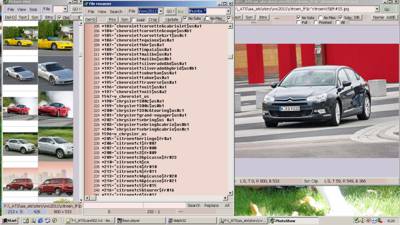
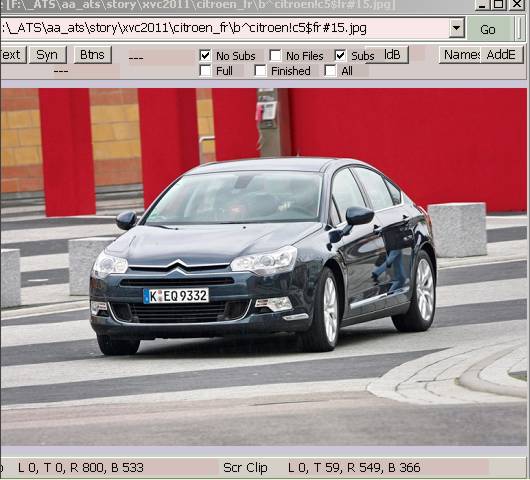
In the picture you see first screen shots from Media Player photo-album / show maintenance system.
On the left there are thumbnails from photos. In the center there is a list from files. On the right there is preview window.

Text base file explorer

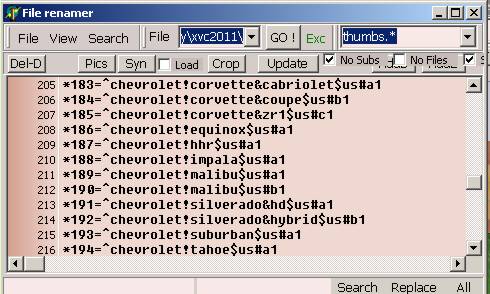
Heart of the system is new kind of file explorer. Photo show maintenance presents disk files in common text editor. You can edit, rename, copy and delete files with the names you see in the box. The box allows you to collect files from multiple directories. Text base file explorer has extended DOS command support. You can have multiple include and exclude definitions. In rename, move and copy you can use wildcards in both definitions. Changes are shown before the action takes place.

Then it allows you to pack multiple files into single entry. The screen shot is from photo show which is released in the web. The single line contains thumbnail file, picture and web page for the presented car. When you for example rename the entry, all underlying files are renamed accordingly. File names follows common text base field definitions, car make is first, then model is marked with !, sub model with &,  manufacturing country with $, car and photo with #. The line begins with a reference to underlying names, and status code for the pack.

In theory system supports all kinds packing methods, but in practice packing is made with equal names. In the sample base separation comes from file extension and the first char in the file name.

Text base thumbnail viewer

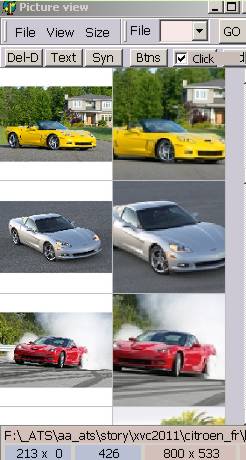
Photoshow has integrated thumbnail viewer.

With viewer it is possible to create thumbnail sets from the photos. It support also cropping of the group files. After you run cropper function, the thumbnail view shows how the photos are cropped. After that you can fix faulty crops, and finally you can crop the photos, into new files or over the source photo.

Thumbnail viewer suffers quite a lot from the poor performance of the binary computers. Due to the way you can collect files into explorer, you cannot cache thumbnails onto harddisk. Must rebuild the thumbnail system, every time explorer changes.

The order of thumbs comes from file explorer. You can reorder and duplicate thumbs with common cut-paste system. You must always apply changes to files and file names.

Text base photo view

Photo view allows more precise cropping. Then you can resize and enhance picture.

The screen and underlying component are not yet finished.

Text base data maintenance

Photos will also get literal data maintenance system. JFIF/Jpeg photos can have title, subject, keywords and author.

Simple Application

Media Player has two kinds of programs. Besides traditional programmed application, there is HTML-DHTML-4-SCRIPT based simple application. Simple application is authored like common web-page. It can be used for creating digital covers Audio CD's and DVD's. Releasing digital books, creating private photo albums. And so on. HTML authoring is quite a lot easier than programming.

The introduced photo-show / album uses web-base. Easy to create a program, with what you create the HTML-Java script system for the album.

Simple application can read and write simple text files ( with a subset of accepted extensions ) to hard disk without nag-screen. Deletion of the files with accepted extensions is confirmed by the browser. When you limit the extensions, it is not possible to install viruses with opened interface. DHTML-4 does not allow you to create executable memory blocks for the opened files.

Bundled media player does not need nag-screens either. Media player programs will get an interface. Interface contains properties, methods and events. When you author HTML page, you add general media player component to it. Then you use the standard commands, properties and events for controlling it. All media players will work properly on the page. Properties must contain audio size, minimum widths and heights for it's user interface. In principle player program's video screen should be made with independent resolution. So that you can play 4k resolution video on display, which is set to 1k or 2k resolution. All 3D graphic cards supports multiple on screen resolutions.

In media player, primaries are in the machine, it's peripherals and multi media you buy to it. Media Player has fixed operating system, you never change it. You do not have to buy upgraded versions from your existing programs, because you had to change the operating system. New tech goes in with add-ons. When you change the player to newer version, old programs and games work just like they did in old player.

Programs, which work with Windows 2000 and Windows XP will work in media player. Hidden, fixed or automated web connection will not work.