September 6th 2018


Applications are written with Java or Visual Basic scripts.
| Media Player | Base Notes Java Net Digi | P-Show Maps Fast Fees Futu ATS | Jack Answers |
|
Media Player - HTML Applications September 6th 2018 |
|
| Tights |
Media player introduces an idea from lightweight applications. Applications are written with Java or Visual Basic scripts. |
Basics for the HTML scripting
|
||||||||||||||||||||||||||||||||||||||||||||||||||||||||||||||||||||||||||||||||||||||||||||||||||||||||||||||||||||||||||||||||||||||||||||||||||||||||||||||||||||||||||||||||||||||||||||||||||||||||||||||||||||||||||||||||||||||||||||||||||||||||||||||||||||||||||||||||||||||||||||||||
Sample
|
||||||||||||||||||||||||||||||||||||||||||||||||||||||||||||||||||||||||||||||||||||||||||||||||||||||||||||||||||||||||||||||||||||||||||||||||||||||||||||||||||||||||||||||||||||||||||||||||||||||||||||||||||||||||||||||||||||||||||||||||||||||||||||||||||||||||||||||||||||||||||||||||
|
HTML size support for executables
I have tested CBS colors with RGB pictures. CBS based picture enhancers are much like BrResize ( already with RGB data ). Before resize the scan was pre-processed with color flattener. Scanned 16-color picture had around 70 000 colors. Flattener dropped the count to 800.
|
Media player File Explorers
Media player File explorer has built in support for playlist behavior. File explorer has two parts, there is display system, then there is underlying file name search / read system. HD unit brings you text-file like lists from file names. You ask parameters, filters and sort order to HD component on file explorer screen. Then you call the component with given parameters. In return you get a list from files. Alternatively you can get events during iterations.
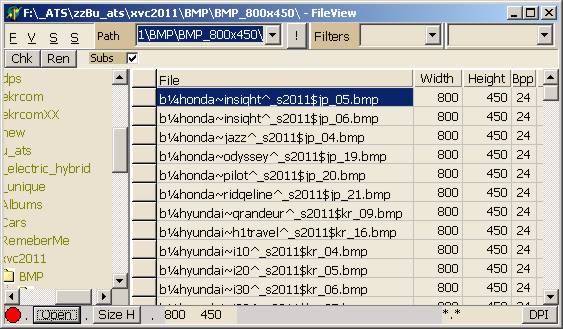
The picture presents text explorer proto. In media player default drag-drop option is filename dragging and dropping. In file menu there is an option for saving and creating file / playlists from the files on the right. There will be converters for various playlist and file list formats, you can choose the converter from the save as dialog.
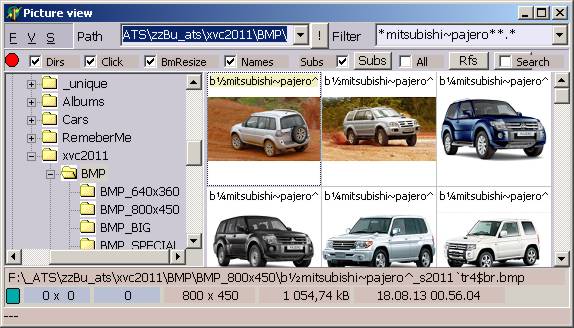
Thumbnail explorer uses the same HD reader than basic explorer. In File menu there is an additional option for saving generated thumbnails to disk. You can use BmResize for creating good quality thumbs from your photos.
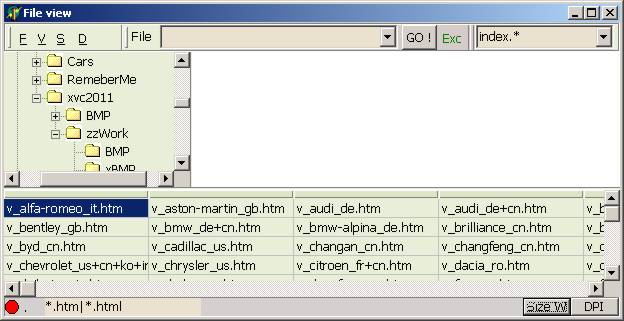
OLE explorer has file list at the bottom ( by default ). The work area can have COM-OLE or self made file viewing / editing component[s]. This explorer shows generated HTML for the photo show. They were still blanks, when I took the screenshot. The file list can also be a list from the ripped DVD-BD directories. The explorer shows the root directory, but the actual directory is VIDEO_TS sub directory.
Explorers have color sets. You can set different colors to different explorer. Alternatively you can set same shades to the explorers, which are synchronized together. There is sync menu with what you can create co-operative groups from opened explorers and forms.
Media players OS concentrates into file processing ... reliable processing of the files. The HD unit makes most from the work, it provides lists or events from the HDD iterations. The display components have properties, methods and settings, which makes it easy to add them into forms.
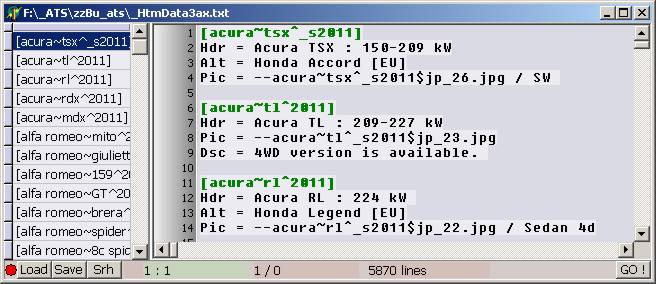
This shot shows you the textbase explorer and maintenance for photo show. With the list on the left you can search cars from the base. You can search, move, copy and delete blocks from the base. You can drag-n-drop file names from all three explorers to the text area.
Text base can have multiple blocks with the same key. All fields inside the block are optional. There is utility which scrolls the base and creates a list from used field names. Pic is needed for getting the photo into slide show. Other fields are more or less informative for the photo show. The names of header, disk-file and description fields are given in settings.
In car show blocks are made so, that each blocks has all photos from one model / year. The first listed file comes to general show, others come to secondary thumbnail line. Secondary line changes every time you choose new photo for the display. The new entry begins with either Hdr-field or null line. Null line entry inherits entries from previous entry.
Header have make and model names in computer compatible format, Hdr field has the name in user format. Computer format needs special marker chars for separating makes, models and years. In header you usually separate variant names with comma.
In 2011 there was lots of marginal cars available. The total number of marginal models often exceeds the number of best selling models. SUV and Space car is expensive to buy ... must admit that ... but the overall sales numbers are modest. Competition from the buyers is tough. Reasonably priced 4 door family cars are the most popular cars in the world.
Spell checker needs field names. Spell checker checks the field names. Hdr can have car make-model list which is used for checking the line. Dsc goes with common text check. Skeleton for file name can be checked for the exiting files, and so on.
COMMENTS
JPEG files comment system turned out to be very messy. You can embed textBase data into files' comment sections ( if format supports comment sections ). Entries are stored just like they are in the base. Property sheet reads the comment section, processes line breakers + tabs and shows the comment.
The comment header record has
- 32 bit size.
- 16 bit code page. Standard code pages misses UTF-8, Unicode is 1200, UTF-8 could be 1210. The code pages ends to 10081. There are room for two attributes. Attribute 16 384 goes to reversed byte order. Attribute 32 768 adds UTF+ feature into ansi, etc. code pages.
- 8-bit-attribute : 64 = HTML tags, 128 = HTML chars. HTML chars attribute checks and converts € and others into characters. HTML tags attribute skips over <> areas. Processing of the format commands is optional. Scripts and others are ignored.
- 5 char ( 40 bit ) html-language code : en-us, de, etc.After this 96 bit / 12 byte header comes the the data. The file data does not need block header and file name.
UTF+
Media player gets UTF+ system, my old development from the year X :
- UTF+ indicator is Char-215. When string processor discovers chr-215, the next two bytes defines the char. The last two bytes are mapped as unpacked 16-bit wide chars. The other chars are processed with current code page. UTF+ allows you to add random wide chars into your document.
- Code page indicator is character 247. When string processor discovers chr-247, the next byte defines new code page for the text. There are less than 64 code pages, they are clamped down with constants. Reversed byte order attribute is 64. All three encoding systems keeps the first 7-bits unchanged.- Control chars for UTF+ are subject to change. In Control chars, characters 14 and 15 are code page related. Nowadays chars 0, 8,9,10, 12, 13 and 27 are used. Chars 28-31 has no usage. They can be used as unique list separators and brackets.
- You can embed 8-bit, UTF-8 and Unicode chars and sections into your documents.
- In UTF-8 and Unicode you make page change with the same chars, not the numbers. The system keeps the char / code page markers in blind charter conversions. Blind conversion will alter characters.In mixed usage, you have to waste one char for indicating the change. There aren't any unused bits, you could use as indicator. Chr-215 is "never used / processed" multiply sign. Chr 247 is "never used / processed" division sign. In complete implementation these two chars always need a special handler. With these indicators common text is almost 100% compatible with UTF+ formatted text.
Possible that there would be slower UTF-h system, where you use characters and end marker for special chars and code pages. System which is almost equal to HTML system. "&" with what you begin HTML definition would be replaced with special char. Could for example use ctrl or alt for entering new chars from keyboard
UTF+ needs a simple loop for calculating character lengths. Windows character conversion routines have flags for UTF-7 and UTF-8 conversion. Code page is missing.
Media player will get a keyboard interface, which sends the current layout to keyboard. Electric or touch screen keyboard can change the displayed key values so, that they match to current layout. Handy feature when you have special fonts, with non-standard glyphs. There are many nice / useful fonts, which are not used, because you cannot see the glyphs. There are many fonts to for example writing mathematical formulas. Quite a many from math symbols are already hidden into common font definitions. They do not have keys in keyboards.
Wide and multibyte characters in Asian sign languages
Asian languages have also 8 bit code pages. Asian writing goes so, that caret moves only with selected keys. The keyboards have signs, with what you draw the words. After you are finished with the word, you move the caret and start to build the next word. Sign languages have simplified scripts, which were made for type writers, and are nowadays used in computers. Type writer was a dummy machine, you could change the chars and keep the writer in one place. If you take a look at the Asian fonts, the available chars fits into 8 bit extra space.
The caret movement is embedded into font files and keyboard layouts.
In sign languages vertical text goes from right to left, horizontal from left to right.
- - - -
Unicode didn't give much for the Asian sign languages. The signs got new unique numbers, just like with other chars. Asian sign script is not very different from others. Glyphs with what you form syllables and words are like alphabet in western world. The number of glyphs with what you form the signs, is at the same levels with character scripts. In sign language you enter more than one characters into same character cell. Chinese, Japanese, Korean languages has as many words as western languages. It means, that signs for whole language exceed wide-chars capacity.
When you use packed DBCS character sets, you have to enter the signs in predefined order. Keyboard handlers does not sort entered dead-chars. In MBCS, where each sign has it's own char, the order is free. Media player can add dead char sort routines to keyboard drivers. When you sort the chars in byte order, common search functions - like InStrS - works with sign language. MBSC is easier to user. MBSC allows you to use non forwarding chars, which triggers key events, but the char has non-forwarding bit set.
Can use the same system with general usage western signs, so that you can see the non-forwarding character right after key press. The dead key handler gets messed rather easily. After few copies and deletes around entered dead key, which misses the second key, the handler does not know a thing from the intended character-key value.
|
|
|
FAT-32
FAT-32 file name uses always 260 characters. Media player could strip the name into standard 256 characters, use one character for the remaining for defining the file type. S - Sound, V - Video, P - Picture, D - Document, T - Text. Then there could be characters for executables, dll libraries, application files, text formatted setting files, temporal files. Another could be used for back up cycling. There are three base types of back ups, system back up is made after installation of the new program. New content back ups are made every now and then. Creative-business backup is made on daily basis.
You can never use the last characters from the FAT-32 name. C-language programs - like Windows - uses 260 character long memory blocks for the filename with full path. The maximum safe file name length is always 260 - path length. When you try rename file with my computer, you get an error message, if the total length exceeds 260 chars.
Einstein and computers
If you do not know or remember around 15 years ago, at around 2005, fiber networks boomed. Due to Einstein, fiber cables were believed to an awful lot faster than electric cable. Companies and various institutes spent billions into fiber / light wave networks. Recommended then, that you should stay with cheaper copper cables. Reason was that they cost a lot and conversions from electricity to light and back takes too much time. You can build A/C networks, whose data transfer capacity per second is at ten least times bigger than with current D/C network. You can for example feed all 32-bits to 32 bit CPU with one wire and one "pulse". You can build systems, whose external speed raises to over 1 GHz.
When media player gets upgrades, you use hard-disk network like system. You build small tech-detectors behind standard connectors. New tech must support old tech. Current USB connector, which supports old com devices, like mouse, keyboard and printer, must always have support for variable connection speeds. Not very clear why they created new connector for USB-3. Cannot see much sense in such.
Installation of the applications
In media player, you make installations under one root folder. Idea is that you can simply drop and delete applications. You do not use system for installation. If you for example use DLL's, you put them into same directory with exe-file. Shared DLL's are from the time, when computers were short on hard disk space. Media player applications are small, when compared to sound, video and picture files. You can use shared settings just like before. File extension lists and shortcuts for launching the application are the only required system level things. Media Player obviously uses simple ini files for these two. In multi user environment you can use [shared] and [username] sections for custom launch systems.
Physical desktop directory could be OS volumes root directory, in desktop view you do not show startup files. My documents should be capable of floating over volumes. Media player has almost always more than one physical hard disk.
Media Player file explorer will get cross volume views. They are made with compiled file lists. File explorer can build the view with file list. The file list can contain files, directories, and other file lists. The lines can have wildcards. You can for example have a DVD view, which is constructed from multiple volumes. The contents of the view is dependent on the hard disks which are currently present. Explorer has also a chance to display contents from the volumes which are not present. These lists are built when disk is attached to player. The contents is iterated and stored onto local disk. You can build these lists also from the back ups, you have burned to CD.
If you have for example Romantic Comedies on multiple volumes, the explorer can collect files with same directory / root directory together. So that all your Romantic Comedies are under the same Romantic Comedies root in the view. Path is always stored with shown files, it does not matter where the shown file is.
Basic demand for simple creation of the shared view is that, you have some kind of standard for naming directories. By default root is the first subdirectory after the path definition. Without standard all directories must be listed independently, with root parameter. Root uses the last given subdirectory as root.
E:\Movies\Romantic Comedies
E:\Movies\Action ScifiF:\Romantic Comedies
F:\Action ScifiWill do :
E:\Movies\
F:\E:\Movies\Romantic Comedies
E:\Movies\Action ScifiF:\Romantic Comedies
F:\My Movies \ Action ScifiWill fail. / Is not simple :
E:\Movies\
F:\Romantic Comedies\ /r
F:\My Movies\Action Scifi\ /rMemory management needs a chance to reserve shared memory. So that you can make the application from multiple exe-files. Use the executables much like units. Currently chance to synchronize applications is exclusive to Microsoft / OS manufacturer. Both offered ways - File Mapping and DDE - are slow, clumsy and they do not work very well. Memory manager can check and prevent calls to the same segment at the same time. In applications you can use the shared memory without troubles.
In Media Player the basic need for shared memory comes from hardware. Video and music player usually needs to check running copies from the application and lead the opening to the running executable. In a shift you got to pass new filename and command line parameters to running copy. Difficult thing to do without shared memory and with existing operating systems. Hardware is shared resource, in principle you can run one hardware oriented program copy at the time. Communication with hardware takes place with global functions, it sets the one-copy at the time demand for the player programs. 3D games have also similar kind of "one-copy-at-the-time" demand. When you limit the number of copies to one, the program and programming job are quite a lot simpler.
Drag drop should be extended to multiple executables, to a clipboard like system. In photo show maintenance you can already drag and drop text from one window to another. Maintenance has clipboard like format system for dragging. In media player users drags file names into playlists. Playlist editors / maintenances need standards for dragging and dropping.
- - HTML bills - -
With TWebBrowser component it is easy to build custom HTML bills. First you build layout for bill with HTML. Then you add id's for receiver, sender, date, etc. Then you update the ids with program. Finally you copy the document from browser and save it to file. Easy to add comments, special terms, etc to selected bills. You can see the bill all the time. Handy system, when you for example write bills at the same time with purchase. Quite a lot easier than R&D billing. R&D billing uses ID-extractor and less flexible writing system.
DHTML-4 plus obviously gets a chance to print the modified document and copy the document as whole.
HTML bill-vouchers needs standard names for the ids. So that you can handle the bills programmatically. When you get a bill from vendor, you can add the bill automatically into system with ids. You can use vendor name/id and vendors bill number for searching the match from existing bills and vendor base.
Then you can create electric acceptance system for the vendor bills. The person who accepts / rejects vendor bills reviews the bill on screen, accepts / rejects it after reviewing the bill. He-she can also write the reason for the rejection and instructions for actions to the bill. The reason and instructions follows the bill ever since. Kids play with HTML bills.
With HTML bills you can get orders, bills, payments, deals, for one delivery onto one screen / display. Everything around the delivery can be brought to your screen with one request-click. Currently such needs paper works and usage of the printer ... request to secretary / financial department.
Then you can create electric graphs and statistics with HTML. Presentations from monthly, quarterly and yearly reports are easy and easy to access. You can add a spreadsheet calculation to HTML document with copy and paste. Same goes to dataBase tables and queries. Graph comes usually as image. Think that Ms Front Page is still the only proper HTML authoring program. In electric usage HTML is always better than other formats. It is designed for screening, not for printing like others. It supports events, animations, positioning, run-time font-color-content changes, scaling, etc. If it does not have the required feature, you can almost always make it with scripts. Supports also paper prints. Collection routines for the reports can be executed and reviewed at anytime.
You can make custom browsers for viewing html bills and documents. You can for example add database search system onto same screen with html viewer. Drop web related menus and panels from the form. Possible to create ( remote controlled ) full screen viewer, without scrollbars, borders and others. ATS games will get a help system, with custom web-browser form.
HTML bill replaces paper copies, you archive all printed HTML bills and vouchers from payments. When customer for example calls and complains, you can get the copy from the sent bill to your screen. When you send electric bills, it seems, that you do not usually have copies from the sent bills. The current status of the bill changes all the time. Paper copies must be searched from the archives. Optical archive from HTML bills saves space, you do not need big storages for the bills. You can store the copies from bills into fireproof safety deposit boxes. You can keep more than one copy from the bills and other essential documents. If you do not remember, there is nowadays a way to literally sign the electric documents. The signature stored and saved as bitmap. You can never alter the contents of an optical disc.
HTML bill allows you to print the bill or send it via network. For your own system the delivery method is insignificant.
Real time and collection systems for financial-business dataBases get usually popular amongst users. Although they didn't know to ask the features. With Queries and HTML forms such things are relatively easy to construct. Difficulty and time it takes to construct the screen and layout, does not prevent you from making special presentations.
Next generation web will make all these things possible. It is an A/C network, capacity-speed is at least 10 times bigger than now. Then there will be safe channels for mail and money related things. On the main page there are talks about closely related personal finance system.
- - Closing statement - -
Most from the most popular Windows programs are nowadays written with Delphi and Pascal. All Windows API functions have Delphi declaration units, which are freely available. Delphi is 2nd native Object Oriented programming language. Visual Basic was first. These two dominates Windows programming.
Most DHTML scripts are written with Java Script. Java Script is supported by Linux-Unix and bigger computers. Basic script is quarantined to work with Windows browsers only. MS DHTML-4 implementation supports almost everything from DHTML-4 definitions. When you write scripts for media player, you got to have a ms-dhtml-4 based browser. After script gets more complicated, others start to fail. The documentation for Ms-Dhtml-4 is not a 100% match for the implementation. There are things which works in wider than documented scale. Then there are things which are said to work, but they don't-
With Delphi and others you can build your own Windows browser for MS-DHTML-4 interface. Most from Ms-internet explorer is made over MS-DHTML-4 interface. WebBrowser component in Delphi does not do a thing without programming. It provides methods and properties for building the actual browser. If I do not remember wrong MS got the DHTML-4 interface from US universities. Also the reason why you can never ask money from web-browser. There will be limitations for accessing web with self made browser, by default it is forbidden. You need some kind of permission to build actual browsers to media player.
When all media player apparatuses have browsers with the same Ms-Dhtml-4 interface, you do not have pay attention to compatibility issues. All scripts and elements have one standard behavior. In media player album, book and DVD covers are expensive artworks. Covers and digital boxes are made with HTML, they must have the same, intended looks in all apparatuses.
If media player gets web, you are never allowed to break the general rules with your programs. Basic demand is that the source for the application is freely available, your Chormes and Firefoxes will be compiled every now and then. Checked for perfect match. Then there will be some other communication and file usage tests, your executables must pass. Not very interested in web. It has turned out be a commercial failure, a place where copyright violations, frauds, spying, extortion and terrorism belong to "legalized" things and everyday stuff.